
Single sign-on for your whole team, across every Takelan app
One sign-in for your team. Every Takelan app. Your ShadowCradle appliances too.
Stop juggling a password for every tool. Takelan SSO gives each person one account with passkeys or an authenticator app, ties in the directory you already run, and lets you decide who can do what. Start free* if you use ShadowCradle.
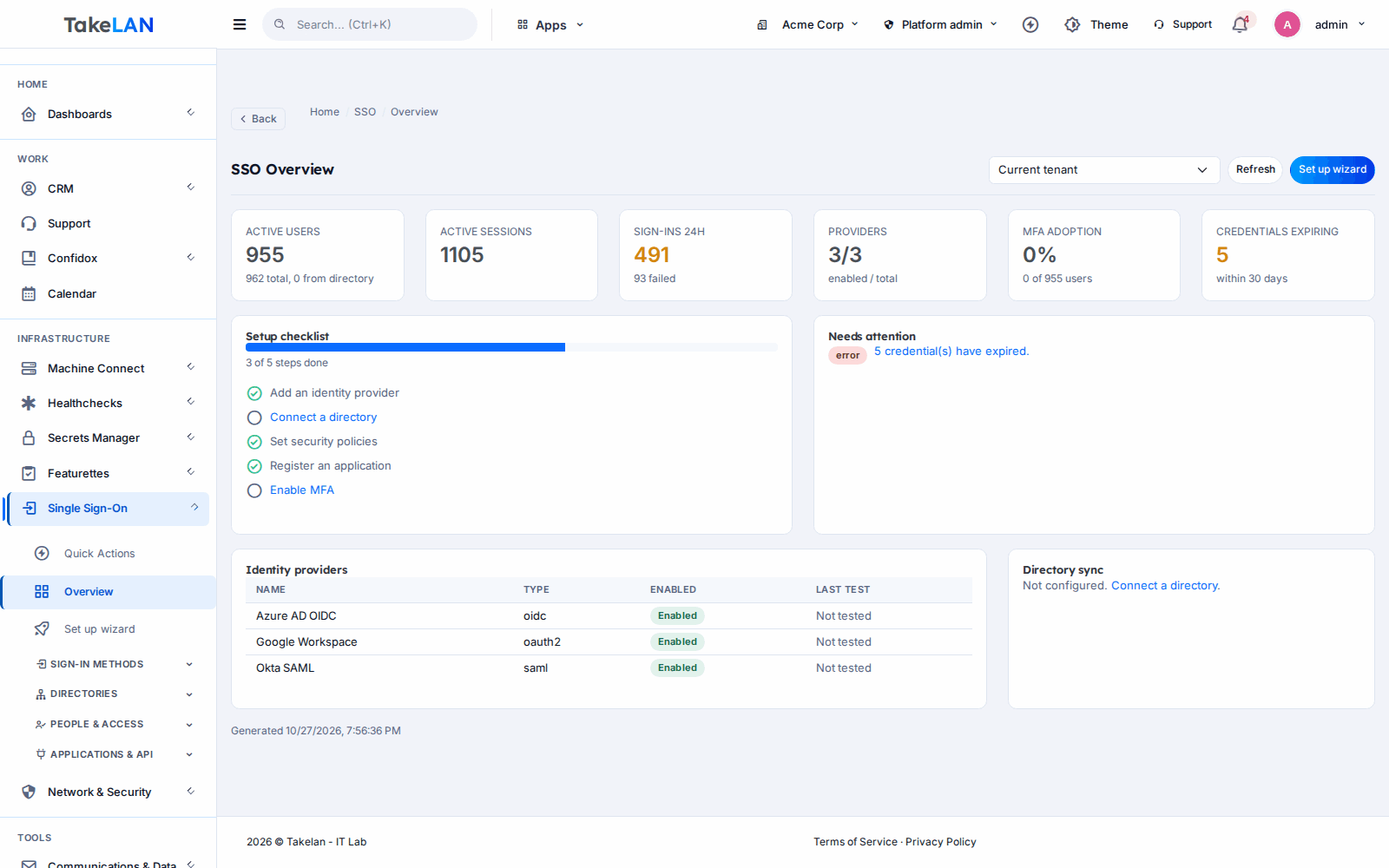
The SSO admin console. Everything about who can sign in is in one place.
Why teams choose it
One account instead of a password pile
Your team signs in once and reaches every Takelan app. Fewer passwords to forget, reset or reuse.
Strong sign-in without the pain
Passkeys let people sign in with a fingerprint, face or device PIN. Authenticator-app codes and single-use recovery codes cover the rest.
Bring your own directory
Connect Microsoft Entra ID, Google Workspace or an on-premises LDAP server. People you already manage show up without retyping them.
Control who can do what
Roles and permissions per tenant. Add security policies for passwords, lockouts, sessions and required two-factor sign-in.
A record of what happened
An audit log, session list and security events show who signed in, from where, and what changed. Revoke a session in one click.
Affordable by design
Start free* if you use ShadowCradle. Beyond platform limits, pricing stays affordable so a small team can have the same sign-in controls as a big one.
What you can do
Sign-in methods
- Email and password. Register, sign in, reset a forgotten password and verify an email address.
- Passkeys. Passwordless sign-in with WebAuthn. Register, rename and remove passkeys from your profile.
- Authenticator app (TOTP). Two-factor codes from any standard authenticator app, with replay protection.
- Recovery codes. Ten single-use codes, stored hashed, for the day a phone is lost.
- Email-code sign-in. Optional sign-in with a one-time code sent to the user's email.
- Google and Microsoft sign-in. Let people use an existing Google or Microsoft account where your deployment has it switched on. Link and unlink at any time.
Single sign-on and federation
- SAML 2.0 service provider. Metadata, SP-initiated sign-in, assertion handling, just-in-time account creation and replay checks.
- External OIDC sign-in. Send users to an OpenID Connect identity provider your tenant configures, then bring them back signed in.
- Takelan as your OIDC provider. Discovery, JWKS, authorization code with PKCE, token, revoke, introspect and logout. Register your own apps.
- Registered applications. Client IDs and secrets per app, with secret regeneration, session revocation and a test button.
- Attribute mappings. Map identity-provider attributes onto Takelan fields and test the mapping before you rely on it.
- Verified domains. Prove you own a domain and resolve conflicts when the same domain is claimed twice.
Directory sync
- Microsoft Entra ID. Test the connection, pick groups, run a sync and review the run history.
- Google Workspace. Mirror users and groups from Google Workspace with the same test, sync and history flow.
- On-premises LDAP. Pull users and groups from your LDAP server, with sync logs for each run.
- Hosted LDAP directory. Use Takelan as the LDAP backend for tools that only speak LDAP.
- Credential expiry tracking. See when federation secrets and certificates expire, with alerts before they do.
Roles and policies
- Role-based access control. Create roles, assign permissions, give them to users and check a permission from your own code.
- Per-tenant security policies. Password rules, lockout, session limits, and required two-factor sign-in with a grace period.
- Tenants and sub-tenants. Separate organizations in a hierarchy, with members, switching between tenants and a usage view. Handy for MSPs.
- Custom domains. Verify your own domain so people sign in on an address that looks like yours.
- Tenant approvals for connected services. Approve each service that may act for your tenant, and see what is connected.
Sessions, audit and abuse protection
- Session list and revoke. See live sessions. Revoke one, all the others, or every session for a user. Force a fresh sign-in.
- Audit log. A searchable record of administrative actions, plus a dashboard.
- Security events. Sign-in events and an IP abuse summary so you can spot a pattern early.
- Admin impersonation with a trail. Support staff can act as a user to fix a problem. Sessions are listed and refreshable.
- Guided setup wizard. Step through a first provider, a first sync and a first policy.
For developers and automation
- API keys. Create, rotate, disable or permanently disable keys. Make a key read-only, set a rate limit, and audit its use.
- Outbound webhooks. Get a signed call when users or tenants change. Rotate the secret, inspect deliveries and retry.
- Token validation endpoint. Let your services check a Takelan token without writing their own login.
- Service tokens. Audience-scoped tokens for server-to-server calls.
- MCP endpoint. Let an AI tool read your identity data. Read-only by default and limited to the caller's own permissions.
- Interactive API docs. The service is a FastAPI app, so the running service serves its own OpenAPI docs.
Data, isolation and recovery
- Soft delete and restore. Deleted tenants can be restored. Permanent purge runs through a preview and a resumable job.
- Tenant backup and restore. Back up a tenant's data and restore it.
- Dedicated-database isolation. Move a tenant to its own database with a test, migrate and rollback path. Operated by platform admins.
Appliances and legacy tools
- Sign in to Cradle appliances. Brokered sign-in so admins of a connected ShadowCradle, VCradle or Firecradle appliance can use their Takelan identity. The appliance keeps its local accounts as a fallback.
- LDAP gateway. A standalone LDAP, LDAPS and StartTLS gateway for legacy tools and other LDAP clients.
How it works
Create your tenant
Sign up and create a tenant for your company, or a sub-tenant for each client if you are an MSP. The setup wizard walks you through the first steps.
Connect where your people already live
Link Entra ID, Google Workspace or LDAP and run a sync. Or add a SAML or OIDC provider so staff sign in with the account they already use.
Set the rules
Pick roles and permissions. Turn on required two-factor sign-in, set lockout and session limits, and ask people to add a passkey.
Plug in your apps
Register an application to use Takelan as its OIDC provider, or call the token endpoint from your own service. Create API keys for scripts.
Watch and respond
Read the audit log and security events. Revoke a session, rotate a key, or let an AI tool help you look around with read-only access.
See how it works
One sign-in for everything
Bring your identity provider
Layers of security
Who it is for
Onboard a new client in an afternoon
Create a sub-tenant for the client, sync their Entra ID or Google Workspace, assign roles and turn on required two-factor sign-in. Their staff sign in once. Your technicians keep their own access across clients, and the audit log shows who did what.
Offboard someone without a scramble
When a person leaves, disable them in your directory and sync. Revoke their sessions and API keys from the console. Check the audit log to confirm nothing else is still open.
Add login to an internal tool
Register the tool as an OIDC application and use authorization code with PKCE. You get passkeys, two-factor sign-in and role checks without building any of them.
Give a ten-person team real security
Turn on passkeys and authenticator codes, require two-factor sign-in, and let people sign in with the Google or Microsoft account they already use where it is enabled. No identity team needed.
Works with
VCradle and Firecradle
The same Cradle cloud serves VCradle and Firecradle organizations, so one identity covers all three products.
For ShadowCradle customers
Connected ShadowCradle organizations can use Takelan SSO with one switch. The organization is mirrored to a Takelan tenant and its users can sign in through Takelan. When connected, ShadowCradle, VCradle and Firecradle appliance admins can be signed in through Takelan SSO. The request goes through the Cradle cloud, so the appliance never holds a Takelan secret, and the cloud can revoke the session. Local appliance accounts stay, and the local root account is always the break-glass. Connection is optional. The Airgap licence works without any Takelan connection.
Free* for connected ShadowCradle organizations.
Takelan SSO is included when you connect. The link is optional and switched on in one place. The Airgap licence tier works without it. How this stays safe.
See the ShadowCradle side*Free within platform limits. Usage beyond limits may be charged to maintain the platform.
API, MCP and AI
Endpoints
POST /api/v1/auth/loginSign in with email and password. Returns a token and sets a refresh cookie.GET /.well-known/openid-configurationOIDC discovery for apps that use Takelan as their provider.GET /.well-known/jwks.jsonPublic keys for verifying OIDC ID tokens.POST /oauth2/tokenExchange an authorization code (with PKCE) for tokens.GET /api/v1/rbac/rolesList roles in your tenant.GET /api/v1/auditRead the audit log.POST /api/v1/api-keysCreate an API key. Keys can be read-only and rate limited.POST /api/v1/webhooksRegister an outbound webhook endpoint.
Example
curl -H "X-API-Key: $TAKELAN_API_KEY" https://app.takelan.com/api/v1/rbac/roles
MCP
The SSO service has an MCP endpoint (POST /mcp on the service, published as /mcp/sso on your Takelan host). It uses streamable HTTP with JSON responses. Tools are built from the service's own routes and run with the caller's own permissions, tenant scope and read-only keys. It is read-only by default. A tenant admin can switch writes on in Settings, MCP, and can turn individual tools off. Routes that mint or reveal credentials, reset passwords, impersonate users or purge tenants are never exposed as tools.
- Authenticate with a user token or an X-API-Key header. Service tokens are for server-to-server calls.
- The running service publishes its own interactive OpenAPI docs. Trust those over any static copy.
Security and trust
- Authenticator codes are replay-protected, and recovery codes are single use and stored hashed.
- Refresh tokens live in an httpOnly cookie.
- Per-tenant policy: password rules, lockout, session limits and required two-factor sign-in.
- Sessions can be listed and revoked by one, by user or in bulk.
- API keys can be read-only, rate limited, rotated and permanently disabled.
- Appliances never hold a Takelan secret. Sign-in is brokered by the Cradle cloud, which can revoke the session.
- MCP access runs with the caller's own permissions and never exposes credential-minting routes.
- MCP writes are off by default until a tenant admin turns them on.
- A revoked API key stops working across the platform in roughly 10 to 30 milliseconds.
- Each tenant's data is isolated, and the audit log records who changed what.
See it
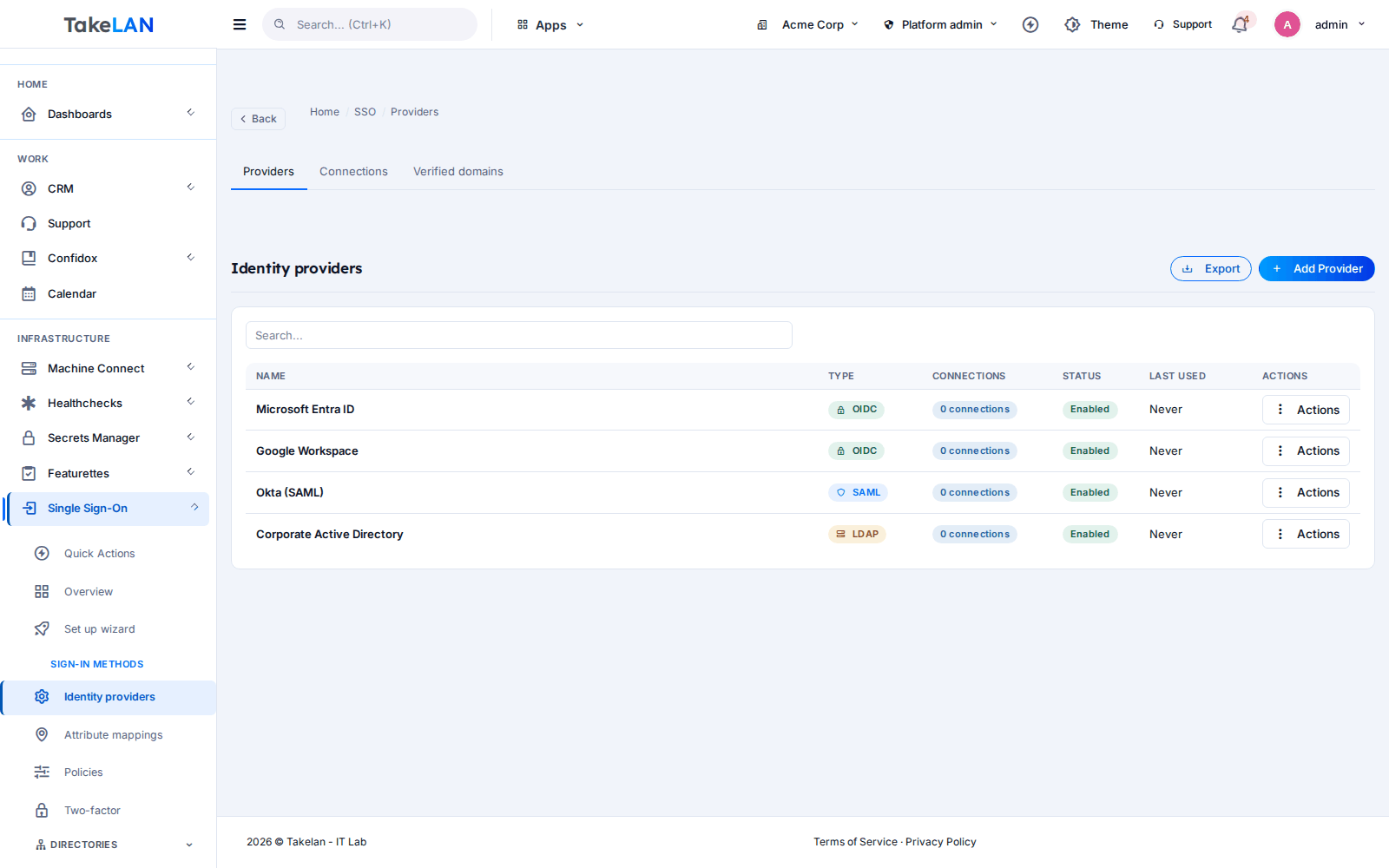
Connect SAML, OIDC and LDAP providers.
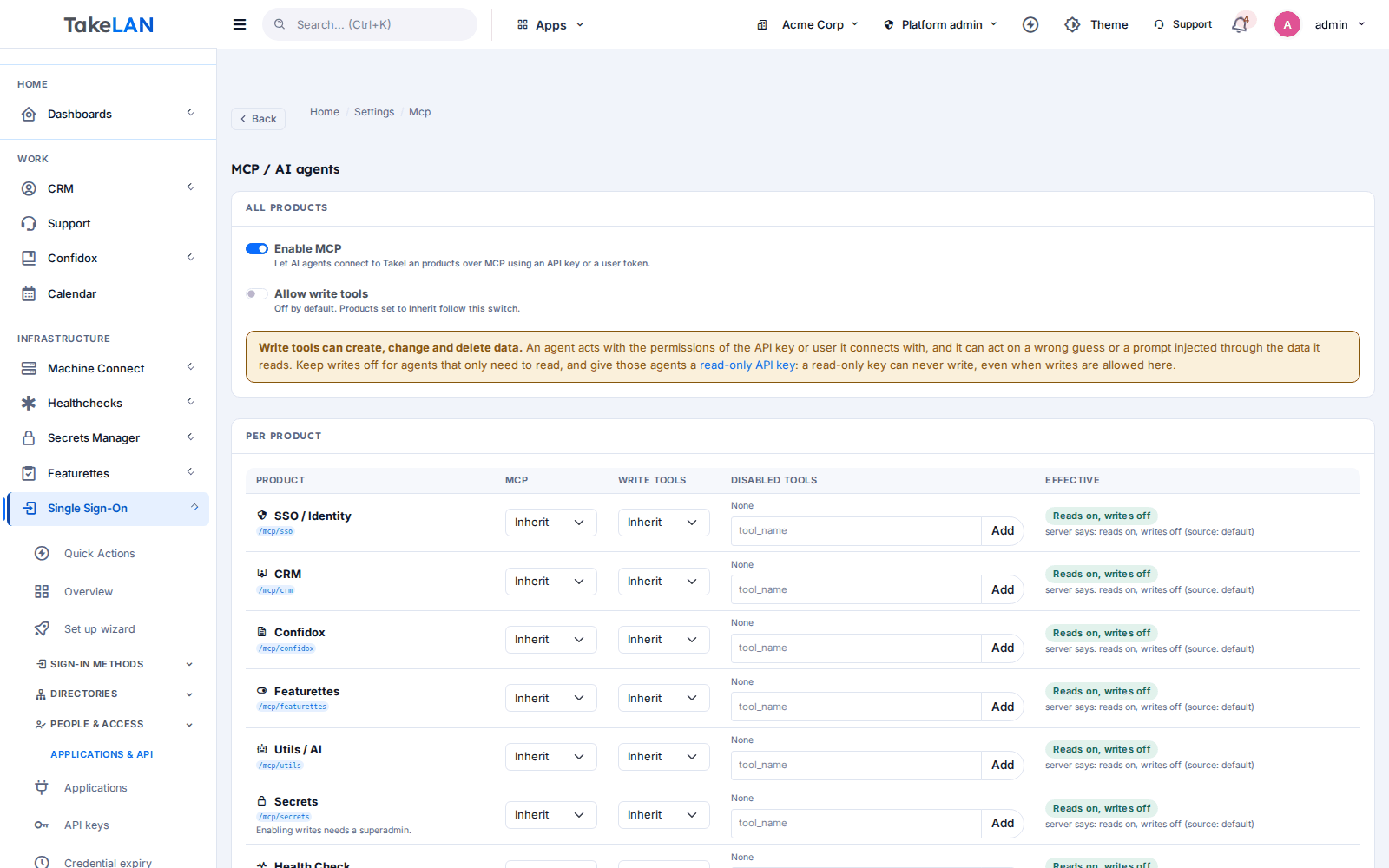
MCP is on for reading and off for writing until you say so.
Affordable by design
Affordable by design. Connected ShadowCradle organizations start free* and get the sign-in controls that larger companies expect: passkeys, directory sync, roles and an audit log. *Free within platform limits; usage beyond limits may be charged to maintain the platform.
*Free within platform limits. Usage beyond limits may be charged to maintain the platform.
See pricingCommon questions
What is single sign-on and why would a small team want it?
Single sign-on means one account for many apps. Your team signs in once instead of keeping a password for each tool. You get one place to add people, remove people and require stronger sign-in. Takelan SSO is built so a small team can use it without an identity specialist.
Does Takelan SSO support passkeys and authenticator apps?
Yes. Passkeys (WebAuthn) and authenticator-app codes (TOTP) are both supported, with ten single-use recovery codes. Email-code sign-in is an optional extra. Other second factors, such as text messages or hardware keys, are not offered.
Can I use SAML or OpenID Connect to sign in?
Yes. Takelan can act as a SAML 2.0 service provider, and it can send users to an external OpenID Connect provider you configure. Takelan can also be the OIDC provider for your own apps, using authorization code with PKCE.
How do I sync users from Entra ID or Google Workspace?
Open directory sync, add a connector for Microsoft Entra ID or Google Workspace, test it, choose groups and run a sync. Each run is kept in a history. On-premises LDAP works the same way.
Can I use Takelan as an LDAP directory?
The hosted LDAP directory is available for tools that need LDAP. A standalone LDAP gateway also serves LDAP, LDAPS and StartTLS clients.
Can ShadowCradle appliance admins sign in with Takelan SSO?
When a ShadowCradle organization is connected to Takelan, its cloud users can sign in through Takelan. Brokered sign-in for ShadowCradle, VCradle and Firecradle appliances goes through the Cradle cloud. Local appliance accounts always stay, and the Airgap licence works without any Takelan connection.
What roles and permissions can I set?
Create roles per tenant, give each a set of permissions and assign them to users. Your own code can ask Takelan whether a user holds a permission. Sub-tenants let an MSP keep each client separate.
Can an AI tool use Takelan SSO through MCP?
Yes, through the MCP endpoint. It is read-only by default. A tenant admin must switch writes on, and each tool can be turned off. The AI tool works with the caller's own permissions, and credential-minting routes are never exposed.
Does Takelan SSO support SCIM provisioning?
No. Use directory sync from Entra ID, Google Workspace or LDAP, or the webhooks and API to keep other systems in step.
What does Takelan SSO cost?
It is affordable by design. Connected ShadowCradle organizations start free* within platform limits. Usage beyond limits may be charged to maintain the platform. *Free within platform limits.
More from the platform
Give your team one sign-in
Create a tenant, connect your directory and turn on passkeys. Start free* if you use ShadowCradle.