
Uptime monitoring and status pages for your websites, servers and certificates
Know it is down before your customers do.
Healthcheck watches your sites, ports, DNS and certificates on a schedule. It tells your tools through signed webhooks, and it publishes a clear status page on your own domain. Start free*.
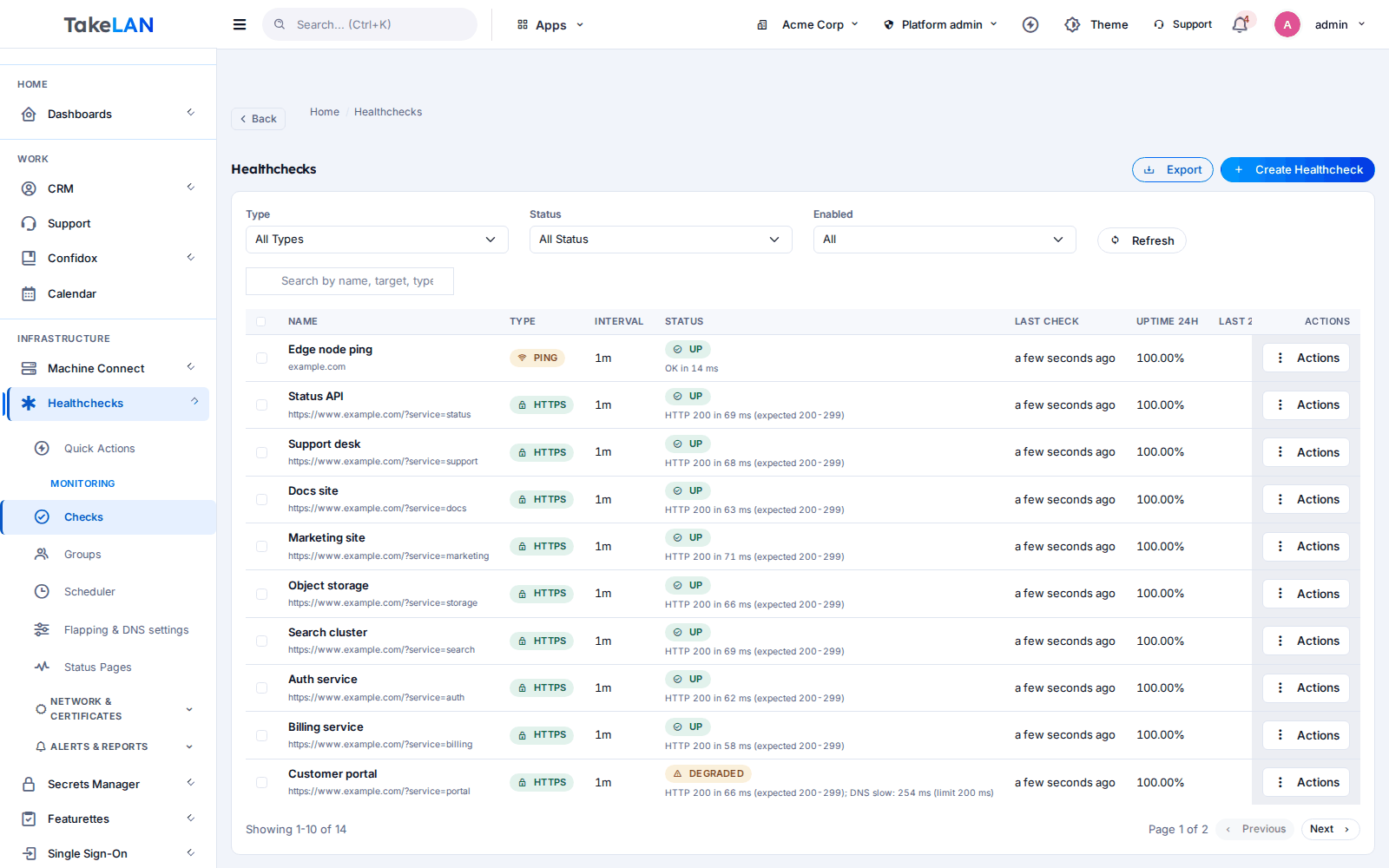
Every check, its last result and its uptime trend in one list.
Why teams choose it
Hear about trouble first
Checks run every minute at the fastest setting. When a check fails, an alert rule sends a signed webhook to your own tools.
Tell customers the truth, on your domain
Publish a status page at status.yourcompany.com. Show only the services you pick. Add maintenance windows, subscribers and feeds.
No more surprise expired certificates
A certificate monitor opens a real TLS connection and reports valid, expiring, expired or error. You get an event before the date, not after.
Reports you can hand to a client
Uptime, downtime and SLA reports are built from stored rollups. Pull a 24 hour, 7 day, 30 day or 90 day view in a click.
Move in an afternoon
Already on Uptime Kuma? Import your monitors with a plan you can review first and a rollback if you change your mind.
Affordable by design
Start free* inside platform limits. Pricing beyond that stays affordable, so you can watch everything, not only the top three sites.
What you can do
Check types
- HTTP and HTTPS. Set the URL, basic auth, a client certificate, or turn certificate verification off for internal hosts. Assert on JSON values in the response.
- TCP and UDP ports. Confirm a service port answers. Useful for mail, SSH, databases and custom apps.
- DNS records. Query a record against your own resolver or any server and port. A DNSSEC option is included.
- Ping. Plain ICMP reachability for routers, servers and appliances.
- MySQL connection. Checks the host and port and the server handshake. It does not run queries.
- Response timing. See where the time goes on a slow HTTP check, step by step.
Schedules and noise control
- Intervals from 1 minute to 30 days. Pick 1m, 5m, 15m, 30m, 1h, 6h, 12h, 1d, 7d or 30d per check.
- Pause, resume and run now. Stop a check during work. Run one on demand to confirm a fix.
- Flap detection. A check that bounces up and down is folded into one flapping event, not a flood of alerts.
- Groups and bulk actions. Organize checks by client or system and change many at once.
Certificate expiry monitor
- Real TLS inspection. Connects to the host, reads the certificate it presents and records the result.
- Four clear states. valid, expiring, expired or error, on a dedicated certificates view.
- Certificate events. Expiring, expired, error and renewed events can drive your webhooks.
Alert rules and webhooks
- Down and slow-response rules. Trigger on a failed check or on response time, with separate failure and recovery thresholds.
- Signed webhooks. Each delivery is signed with HMAC and carries a replay window, so your receiver can trust it.
- Delivery log and test button. See what was sent and what came back. Send a test before you rely on a rule.
- Mute and toggle. Silence a rule for a maintenance job without deleting it.
- Safe destinations. Webhook targets are checked so they cannot be pointed at internal addresses.
Status pages
- Public pages you control. Choose which checks appear, set the theme and preview before you publish.
- Custom domains. Serve the page from your own hostname, with a verification step.
- Subscribers. Visitors sign up with double opt-in. You can export the list and manage suppressions.
- RSS and Atom feeds. Let people follow updates in a reader.
- Embeds and badges. Drop a status widget into your site, or show an SVG badge per page or per component.
- Languages. Show the page in the language your visitors use.
- Maintenance windows and history. Announce planned work, keep a public history, and edit the explanation as things change.
Uptime, downtime and SLA reports
- Uptime rollups. Results roll up from 5 minute to hourly to daily records, so long ranges load fast.
- 24h, 7d, 30d and 90d views. Charts and sparklines for each check and for the whole account.
- Downtime and SLA reports. Reports list downtime periods and compare uptime with a 99.9 percent threshold. That threshold is a report setting, not a promise.
- Live updates. The dashboard refreshes over a live connection as results arrive.
DNS test suite
- 40+ DNS tests. Checks across five categories for delegation, records and DNS security posture.
- Domain check report. Enter a domain and get a readable report of what is right and what is not.
- Bulk testing. Run the suite on up to 1,000 domains at once, or upload a file.
Import and automation
- Uptime Kuma importer. Preview the plan, import, and roll the batch back if needed.
- Import and export. Move check definitions in and out of the platform.
- REST API. Everything in the interface is available through the API with your Takelan key.
- MCP endpoint. Let an AI agent read your monitors and reports. Read-only by default.
How it works
Add a check
Pick a type, enter the address and choose how often to run it. Or import your monitors from Uptime Kuma.
Healthcheck runs it on schedule
The scheduler runs each check, records the result and builds uptime rollups. Flapping checks are folded together to cut noise.
Alert your tools
Create a rule for down or slow response. A signed webhook goes to your chat bot, ticket system or automation.
Publish and report
Pick the checks to show, put the page on your own domain, and send clients their uptime report.
See how it works
From check to alert
Monitors feed a public status page
From raw checks to the uptime report
Who it is for
A status page for every client
An MSP onboarding a new client groups that client's checks, builds a page with only their services, and serves it from a hostname the client recognizes. Month end, the same data becomes an uptime report.
Watch a ShadowCradle appliance web page and its certificate
Add an HTTPS check for the appliance web interface and a certificate monitor for the same host. You see an outage in minutes, and an expiring certificate weeks ahead. This is a normal HTTPS check you set up yourself.
Pipe alerts into your own tooling
Point a webhook rule at a small receiver, verify the HMAC signature, and open a ticket or post to a channel. Use the REST API or MCP to read results back.
Sort out a DNS problem fast
Mail is bouncing after a move. Run the DNS suite on the domain and read the report. It points to the record or delegation that is wrong, so you can send the fix to your host.
Works with
Uptime Kuma
Import monitors from an existing Uptime Kuma setup.
For ShadowCradle customers
Connected ShadowCradle organizations can use Takelan SSO and the free* services, including Healthcheck, with one switch. It is optional. An Airgap licence works without any Takelan connection. You can also point Healthcheck at the web interface of your own appliance.
Free* for connected organizations.
Takelan SSO is included when you connect. The link is optional and switched on in one place. The Airgap licence tier works without it. How this stays safe.
See the ShadowCradle side*Free within platform limits. Usage beyond limits may be charged to maintain the platform.
API, MCP and AI
Endpoints
GET /api/v1/healthchecksList checks.POST /api/v1/healthchecksCreate a check.POST /api/v1/healthchecks/{id}/executeRun a check now.GET /api/v1/reports/uptimeRead the uptime report.POST /api/v1/alertsCreate an alert rule.GET /api/v1/status-pagesList status pages.POST /api/v1/dns-tests/runRun the DNS test suite on a domain.GET /api/v1/public/status/{slug}Public status page data.
Example
curl -H "X-API-Key: $TAKELAN_API_KEY" https://app.takelan.com/api/v1/healthchecks
MCP
The MCP endpoint is app.takelan.com/mcp/healthcheck. It uses your API key or sign-in, and every call runs with your own permissions. It is read-only unless your organization turns writes on in its Takelan settings. Actions that probe or run a check, bulk import and export, and webhook delivery logs are not exposed by default.
AI
- Status page notice drafting is opt-in per page and off by default. It is not switched on across the platform yet.
- Check the OpenAPI file for exact request fields before you build against an endpoint.
Security and trust
- Sign in with Takelan SSO. Data is separated per organization.
- Check secrets, such as passwords for monitored endpoints, are stored encrypted.
- Webhooks are signed with HMAC and include a replay window.
- Webhook destinations are guarded against requests to internal addresses.
- MCP is read-only by default and runs with the caller's own permissions.
See it
All your monitors in one list.
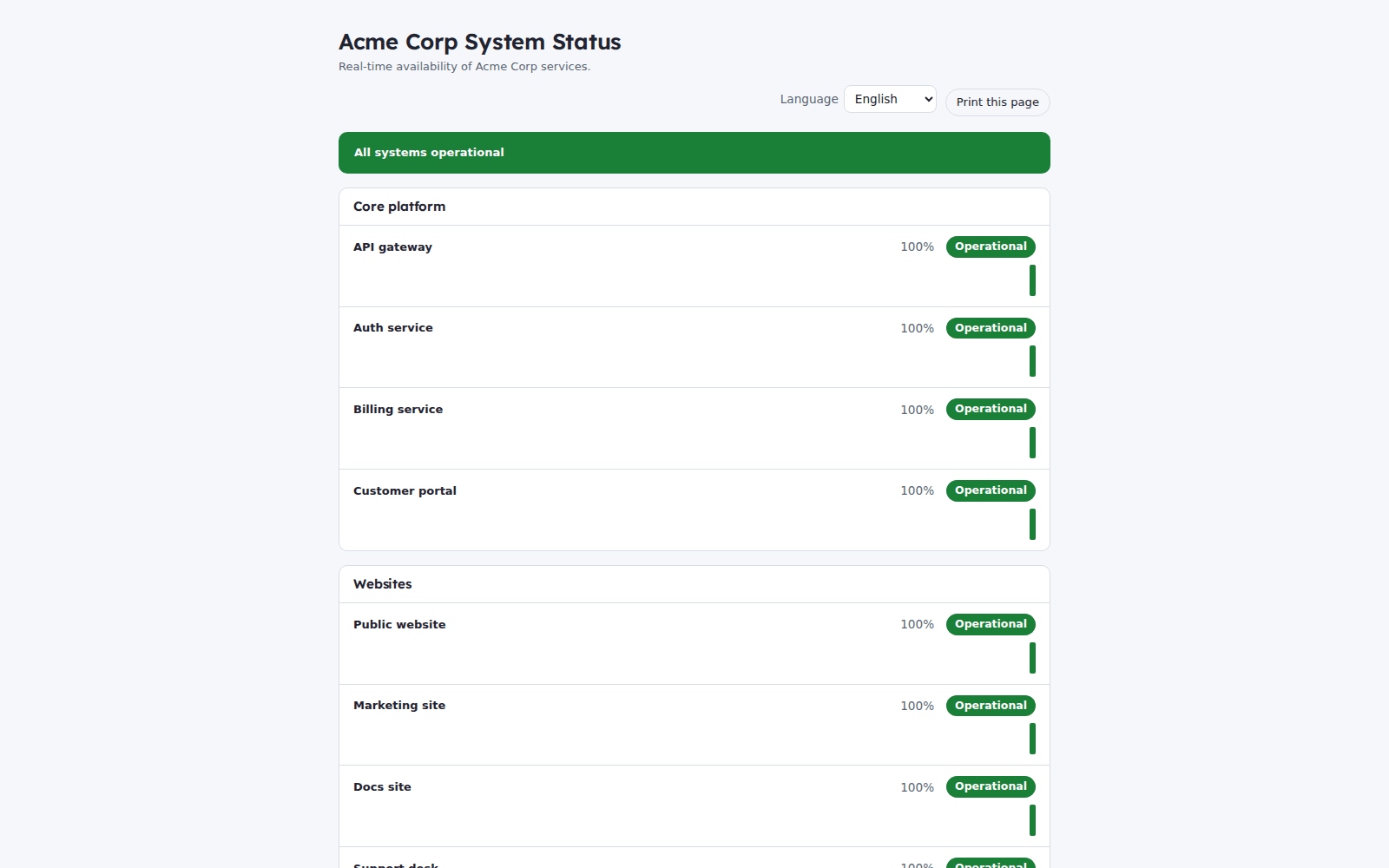
A public status page with only the services you choose.
Affordable by design
Healthcheck is affordable by design. Start free* inside platform limits. Beyond that, pricing stays affordable so you can monitor every client, not just the big ones. *Free within platform limits; usage beyond limits may be charged to maintain the platform.
*Free within platform limits. Usage beyond limits may be charged to maintain the platform.
See pricingCommon questions
What can I monitor with an uptime monitoring tool like Healthcheck?
HTTP and HTTPS URLs, TCP and UDP ports, DNS records, ping, and a MySQL host and port. TLS certificates have their own expiry monitor.
How often do checks run?
You choose per check: every 1, 5, 15 or 30 minutes, every 1, 6 or 12 hours, or every 1, 7 or 30 days.
Does Healthcheck monitor from several regions?
No. Checks run from the Healthcheck service itself. There is no multi-region probe network today.
Can I get an alert when a certificate is about to expire?
Yes. The certificate monitor reads the real certificate and marks it valid, expiring, expired or error. Those events can feed your webhooks.
How do I get alerts? Does it send email, SMS or Slack?
Alert rules send signed webhooks. Point a webhook at your chat, ticket or automation tool. Native email, SMS and Slack channels are not part of the alert rule builder.
Can I run a status page on my own domain?
Yes. Add your hostname, verify it, and serve the page from there. Pages support subscribers with double opt-in, RSS and Atom feeds, embeds, badges, languages and maintenance windows.
How do I move from Uptime Kuma?
Use the importer. It shows a plan first, imports your monitors, and lets you roll back the batch.
Does it promise a certain uptime or SLA?
No. Healthcheck measures your services. The 99.9 percent figure in SLA reports is a comparison threshold, not a guarantee from Takelan.
What is the DNS test suite?
A set of more than 40 tests in five categories that checks delegation, records and DNS security posture for a domain. You can run it on up to 1,000 domains in one batch.
Can an AI agent use Healthcheck?
Yes, through the MCP endpoint. It is read-only by default and uses the caller's own permissions. AI notice drafting for status pages is separate, opt-in per page, and off by default.
More from the platform
Add your first check in minutes
Start free*, watch your most important service, and put a status page in front of your customers.