
Featurettes - feature flags & rollouts for every environment
Ship dark. Turn on when ready.
Put new code behind a flag, release it to a few users, then widen the circle. If something looks wrong, switch it off or roll back. No new deploy needed. Start free*.
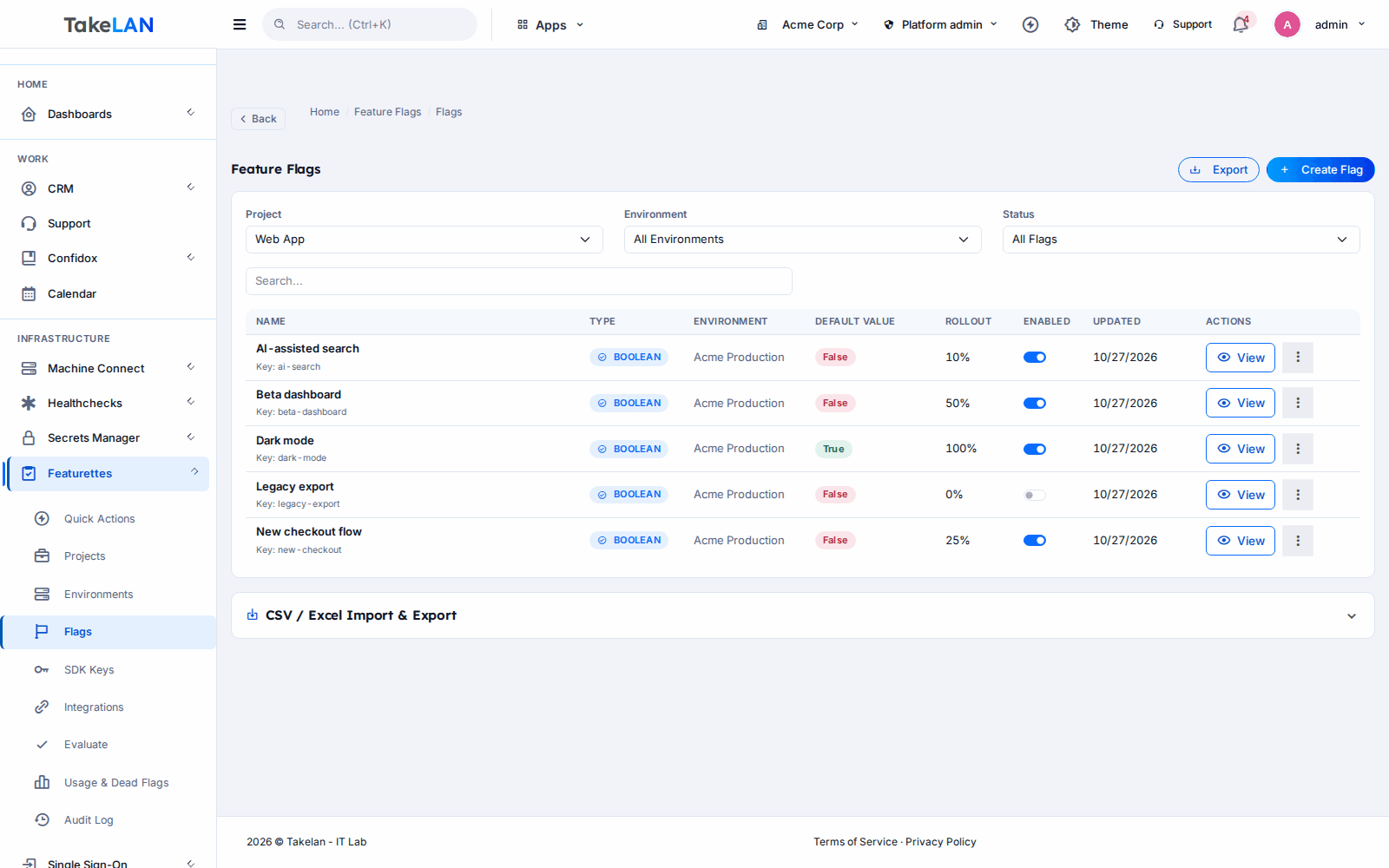
One flag, one page: values per environment, targeting, rollout and history.
Why teams choose it
Release without fear
Deploy code any time, with the new behavior switched off. Turn it on when you are ready, not when the build finishes.
Widen the circle slowly
Start with your own team, then a small percentage of users, then everyone. Each step takes a few clicks.
Undo in seconds
Every change is saved as a version. Compare two versions side by side and roll back to the one that worked.
Know who changed what
An audit log records flag changes and every time an SDK fetches its config. Answer "who turned that on?" in one search.
Keep the flag list clean
Usage metrics and dead-flag detection show which flags nobody reads anymore, so old switches do not pile up.
Affordable by design
Start free* within platform limits. Pricing beyond that is built to stay affordable for small teams and MSPs.
What you can do
Projects, environments and flags
- Projects. One project per app or product. Add members and roles, and see stats per project.
- Environments. Dev, staging and production each get their own flag values. Archive and restore environments when plans change.
- Four flag types. Boolean, string, number and JSON values. Use JSON for small config blocks, not only on/off.
- Flag status. Each flag is active, inactive or archived. An inactive flag returns its default value.
- Quick actions. Create a flag, toggle it, or start a quick rollout from the flag list in a couple of clicks.
- Test an evaluation. Pick a user and context in the admin UI and see exactly what value that user would get.
Targeting and rollouts
- Targeting rules. Match on user attributes with 11 operators: equals, not equals, contains, not contains, starts with, ends with, greater than, less than, in, not in and regex.
- Rule priority. Rules run in priority order. The first match wins, so you can write a narrow rule above a broad one.
- Per-rule percentage. A rule can apply to only a share of the users it matches.
- User overrides. Force a value for one user, with a reason and an optional expiry. Good for a customer who needs a fix today.
- Percentage rollouts. Release to 5 percent, then 25, then 100. A user keeps the same answer each time, so nobody flickers between old and new.
- Clear evaluation order. Override first, then targeting rules, then percentage rollout, then the default. No guessing.
History, audit and cleanup
- Versioning. Every flag change becomes a version you can open later.
- Diff and rollback. Compare two versions, then roll back to a known-good one.
- Audit log. Actions, stats and sessions are recorded. Config fetches by SDKs are logged too.
- Usage metrics. See how flags are being read across environments.
- Dead-flag detection. Spot flags that nothing evaluates, so you can remove them with confidence.
SDK keys and delivery
- Per-environment SDK keys. Create, list, rotate and revoke a key for each environment. The full key is shown once, at creation.
- Public evaluation endpoints. Your app calls a simple HTTPS endpoint with its SDK key and gets evaluated flags back. Works from any language.
- JavaScript / TypeScript SDK. Caching, polling for changes, change events and a safe default when the service cannot be reached.
- Polling delivery. SDKs check for changes on a timer. Updates arrive on the next poll, not instantly.
Import, export and backup
- CSV and XLSX import/export. Move flags, projects and environments in and out as spreadsheets. Handy for bulk edits and reviews.
- Tenant backup and restore. Export your whole Featurettes setup and restore it later.
- Tenant isolation. Each organization sees only its own projects. Product roles control who can edit.
- Takelan SSO sign-in. Sign in with Takelan SSO, the same identity used across the platform.
Agents and automation
- MCP endpoint. AI agents can read flags, projects and audit history over MCP. Read-only by default.
- Tenant switch for writes. Your organization chooses whether agents may change anything. Writes stay off until you turn them on.
- Your permissions apply. Agents act with the caller's own permissions, never more.
- REST API. Everything in the admin UI is also an API call, for scripts and pipelines.
How it works
Create a project and an environment
Make a project for your app. Add dev, staging and production. Each environment gets its own SDK key.
Add a flag and wrap your new code
Create a flag, for example new-checkout, with a safe default of off. In your app, ask the flag which path to run. Deploy as usual. Nothing changes for users.
Turn it on for the right people
Add a targeting rule for your own team, then a 10 percent rollout, then more. Use a user override for one customer who needs it early.
Watch, roll back, clean up
Check the audit log and usage metrics. If it misbehaves, switch the flag off or roll back to the last good version. When the feature is final, remove the flag.
See how it works
How a flag decides
Ship dark, turn on when ready
How an appliance gets its flags
Who it is for
Ship dark on Friday
You merge a risky change late in the week. It is behind a flag set to off. On Monday you turn it on for the team, then 5 percent of users, then everyone. If error rates climb, you flip it off without a deploy.
Pilot a feature with one client
An MSP wants a new portal screen tested by one friendly client first. A targeting rule matches that client's organization only. Other clients never see it. When the pilot goes well, the rule widens.
Change settings without a change window
An internal tool needs a new timeout and a different banner message. Both live in a JSON flag. The team edits the value, the audit log records who did it, and a rollback is one click away.
Run a seasonal switch
A shop turns on a holiday banner and a gift-wrap option. Staff toggle them in the admin UI. After the season, dead-flag detection reminds the team to remove them.
Works with
For ShadowCradle customers
ShadowCradle and Firecradle appliances do not call Featurettes directly. They talk to ShadowCradle cloud (cloud-app), and cloud-app reads the flags. When connected, an appliance either pulls its flags from cloud-app or receives them through a push command. Every flag has a safe local default. If the box cannot reach the cloud, the local default is used, so the appliance keeps working. Flags control operational choices such as cloud event relay, config backup upload, support bundle upload and check-in interval. They never gate security or licensing. An admin page in cloud-app shows each value and where it came from: cloud, cached or local default.
Free* for connected ShadowCradle organizations within platform limits. Optional. An Airgap licence works without any Takelan connection.
Takelan SSO is included when you connect. The link is optional and switched on in one place. The Airgap licence tier works without it. How this stays safe.
See the ShadowCradle side*Free within platform limits. Usage beyond limits may be charged to maintain the platform.
API, MCP and AI
Endpoints
GET /config/{project_key}Public. Evaluated flags for an environment and user. Authenticate with an SDK key.GET /config/{project_key}/flag/{flag_key}Public. One evaluated flag.GET /api/v1/feature-flagsList flags (signed-in admin API).POST /api/v1/feature-flags/evaluateEvaluate flags for a test user (signed-in admin API).GET /api/v1/feature-flags/{id}/versionsList versions of a flag. Diff and rollback live beside it.GET /api/v1/audit/logsRead the audit log.
Example
curl -s "https://app.takelan.com/config/my-project?environment=production&user_id=user-123" \
  -H "X-API-Key: $FEATURETTES_SDK_KEY"
MCP
Featurettes exposes an MCP endpoint (Streamable HTTP, POST) at /mcp/featurettes on app.takelan.com. Most admin REST routes become tools: flags, targeting, versions, audit and projects. It is read-only by default, and writes need your organization to switch them on. Tool calls run with the caller's own permissions. Public SDK config routes, webhooks, and SDK key creation or rotation are not available as tools, so an agent can never read or mint a key. Authenticate with an API key or bearer token, never anonymously.
- Admin routes use your Takelan sign-in token. Public config routes use an SDK key.
- Always keep a safe default in your code. If the service cannot be reached, your app uses it.
Security and trust
- SDK keys are per environment. Create, rotate and revoke them at any time.
- A new SDK key is shown once, in full, when you create it.
- Each organization is isolated. Roles control who can change flags.
- Flag changes and SDK config fetches are written to an audit log.
- The MCP endpoint is on by default but read-only. Writes need a tenant switch, and sensitive routes are excluded.
- Your app should keep a safe default for every flag, so an unreachable service never breaks it.
See it
Flag detail: values, targeting, rollout and history in one place.
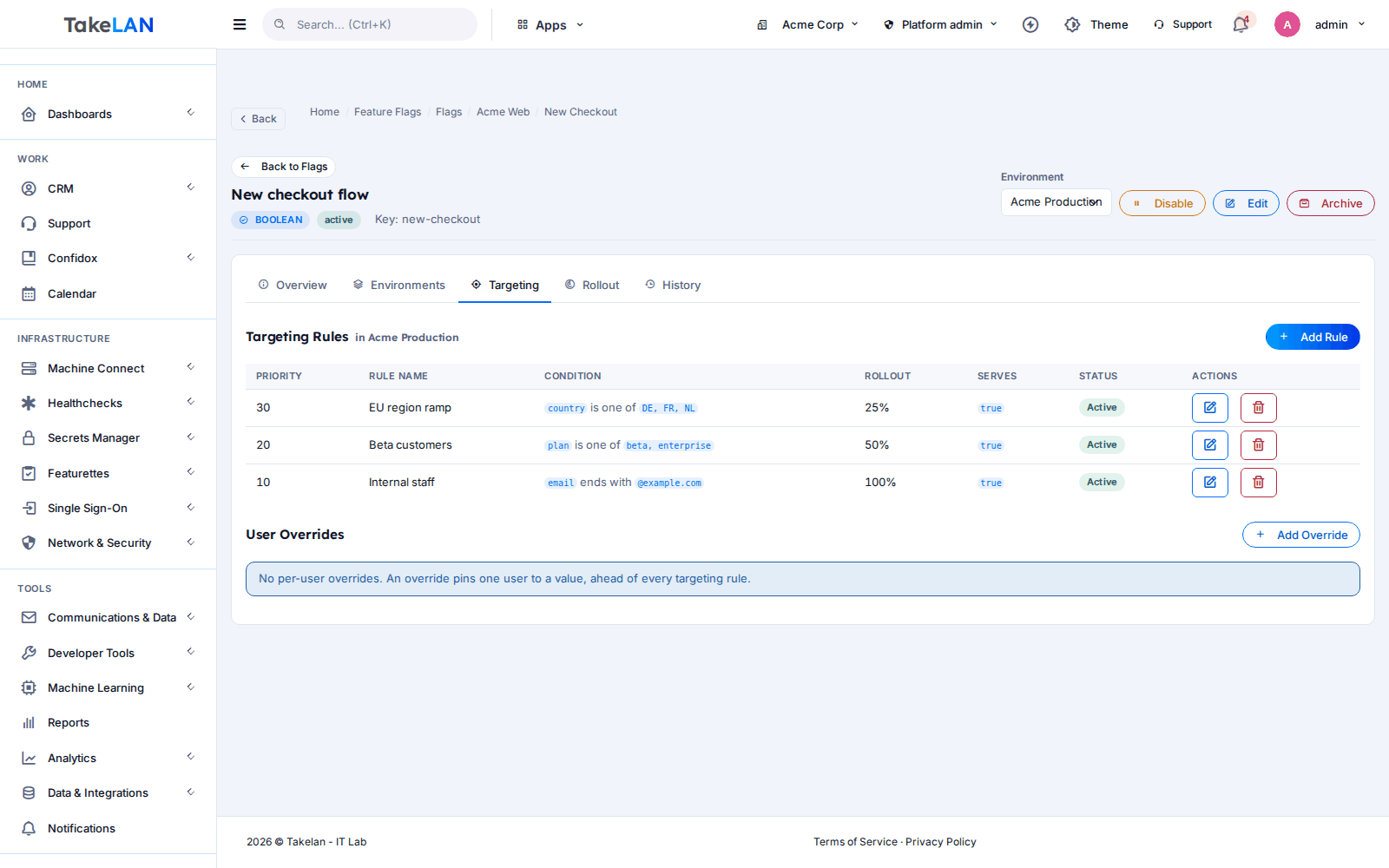
Targeting rules decide who sees a flag.
Affordable by design
Affordable by design. Start free* with Featurettes within platform limits, ideal for small teams and MSPs. Pricing beyond that is built to stay affordable. *Free within platform limits; usage beyond limits may be charged to maintain the platform.
*Free within platform limits. Usage beyond limits may be charged to maintain the platform.
See pricingCommon questions
What is a feature flag?
A feature flag is a switch in your code that decides which behavior runs. You change the switch from a dashboard, not by deploying again. Featurettes stores the switches and tells your app the current value.
What does "ship dark" mean?
You deploy new code with its flag turned off, so users see no change. Later you turn the flag on for a few people, then more. The deploy and the release become two separate steps.
How do I do a percentage rollout with Featurettes?
Open the flag, set a rollout percentage and save. Users are placed in a bucket by their user ID, so each person keeps the same answer every time. Raise the percentage as your confidence grows.
What can I target with a feature flag?
Any user attribute you send with the request. Rules use 11 operators: equals, not equals, contains, not contains, starts with, ends with, greater than, less than, in, not in and regex. Rules run in priority order and can carry their own percentage.
Can I roll back a feature flag?
Yes. Every change creates a version. You can compare two versions with a diff and roll back to an earlier one. You can also set the flag to inactive, which returns its default value.
Is there a kill switch?
There is no separate kill switch feature. Setting a flag to inactive does the same job: it returns the default value. It is one click in the flag list.
Does Featurettes push changes to my app instantly?
No. SDKs poll for updates on a timer, so a change shows up on the next poll.
Which SDKs are available?
The JavaScript and TypeScript SDK is available. Any language can call the public HTTPS endpoint with an SDK key.
Can a flag target a saved segment of users?
Segments can be created and managed. Use targeting rules on user attributes instead.
Do changes need approval before they go live?
No. Approval records exist, but they do not block a change. Use roles to limit who can edit, and the audit log and rollback to review and undo changes.
How do ShadowCradle appliances use Featurettes?
They never call it directly. ShadowCradle cloud reads the flags and gives them to connected appliances, by pull or by a push command. Each flag has a safe local default that applies when the box is offline. Connection is optional, and an Airgap licence works without any Takelan connection.
Can an AI agent manage my flags?
It can read them over MCP at /mcp/featurettes. The endpoint is read-only by default. Writes need your organization to turn them on, and the agent only has the permissions of the person or key it uses.
What does it cost?
Start free* within platform limits. Pricing beyond that is built to stay affordable. *Free within platform limits; usage beyond limits may be charged to maintain the platform.
More from the platform
Ship your next change dark
Create a project, add a flag, and turn it on for the first ten users. Start free*, and see how calm a release can feel.