
Takelan AI: a gateway, a knowledge store and assistants you control
AI you can steer: your model, your limits, your data rules.
Takelan puts one gateway in front of many models. Use the platform default, bring your own OpenAI, Anthropic, Azure AI or Ollama, or keep it on your own devices. Add a knowledge store and an Assistant that cites its sources. Optional everywhere. Start free* if you use ShadowCradle.
The Assistant answers with numbered sources so you can check each claim.
Why teams choose it
One endpoint, many models
Send chat, batch and embedding calls to one OpenAI-shaped endpoint. Add cost, latency or quality hints and let failover handle a bad moment.
Bring your own model
Register OpenAI, Anthropic, Azure AI, a self-hosted Ollama, or any compatible endpoint. Your keys are held in Takelan Secrets and never returned.
Keep it on your own devices
Set the routing policy to on_prem_only and AI calls go only to your own pool. If it is down you get an error, not a silent cloud call.
Spend that stays under control
Set tenant budgets for cost, tokens and request rate. Over the cap, calls stop with a clear message and you see alerts as you get close.
Answers you can check
The knowledge store and Assistant cite numbered sources. Your documents stay in your tenant's own scope.
Affordable by design
Start free* if you use ShadowCradle. Beyond platform limits, pricing stays affordable. AI is optional and off until you use it.
What you can do
AI Gateway
- Chat completions. OpenAI-shaped chat with streaming, 24-hour idempotency keys and a routing block in the reply.
- Cost, latency and quality hints. Tell the router what matters most for each call.
- Failover. On a temporary provider error the gateway can try another provider.
- Batch and inference. Send up to 100 requests in one batch, or queue single prompts.
- Embeddings and similarity search. Create vectors, cache them per tenant and search by meaning.
- Async with signed webhooks. Get a 202 and a request id, then receive the result at your URL, signed with HMAC-SHA256, with retries.
Choose where AI runs
- Platform default model. Works with no setup. Runs on Takelan-operated model hosts.
- Bring your own provider. OpenAI, Anthropic, Azure AI, Ollama, or a generic OpenAI-style or Anthropic-style endpoint.
- On-premises device pool. Run AI jobs on your own enrolled devices.
- Routing policy: mixed or on_prem_only. mixed uses any of your providers. on_prem_only uses only your on-prem pool and errors if none is up. Policy changes are audited.
- Private endpoint safeguards. Provider URLs are checked. Internal and metadata addresses are blocked. Private addresses need an admin opt-in.
Budgets and visibility
- Tenant budgets. Cost, token and request-rate ceilings. Over the cap returns HTTP 402 or 429 with a clear budget error.
- Budget alerts. Events when usage nears or reaches the threshold.
- History and statistics. List past requests with tokens and cost. Prompts and results are stored with the record.
- Per-feature model choice. Pick a model for features such as summarization or the assistant, unless a platform model lock applies.
Knowledge store and Assistant
- Per-tenant knowledge store. Add text or upload text, PDF and image files. OCR handles scans.
- Search and ask. Semantic search, and questions answered with numbered sources.
- Platform and tenant scopes. Answers can use shared Takelan docs plus your own documents. Your tenant comes from your token only.
- Assistant panel in the web app. Chat from any page, with optional page context.
- Browser-side redaction. Tokens, keys, emails, IPs and ids are removed in your browser. You see a preview first. Chat stays in the browser session.
AI in Takelan Customer Desk
- AI Sales Studio. Draft briefs, playbooks, email templates, sequences, call scripts and campaign plans. Everything is saved as a draft for a person to approve.
- Quotas on AI use. Hourly job, daily token and input-size limits protect your budget.
AI in the Cradle products
- ShadowCradle RECO assistant. Off by default. Point it at any OpenAI-compatible endpoint, including a model on your own network. It proposes actions and never runs them.
- Works air-gapped with a local model. No cloud connection is needed when the model is on your network.
- Firecradle assistant. Opt-in plain-language help. You supply your own key, and it needs internet access.
- VCradle. No AI assistant. VCradle has an MCP endpoint for your own agent.
How it works
Start with the default or bring your own
Call the gateway right away with the platform model, or register your own provider or on-prem pool.
Set your rules
Pick mixed or on_prem_only. Set a tenant budget. Choose models for features.
Feed it your knowledge
Add runbooks, policies and scans to the knowledge store. OCR makes scans searchable.
Ask and check
Use the Assistant or the ask API. Every answer lists numbered sources.
Let your agent in
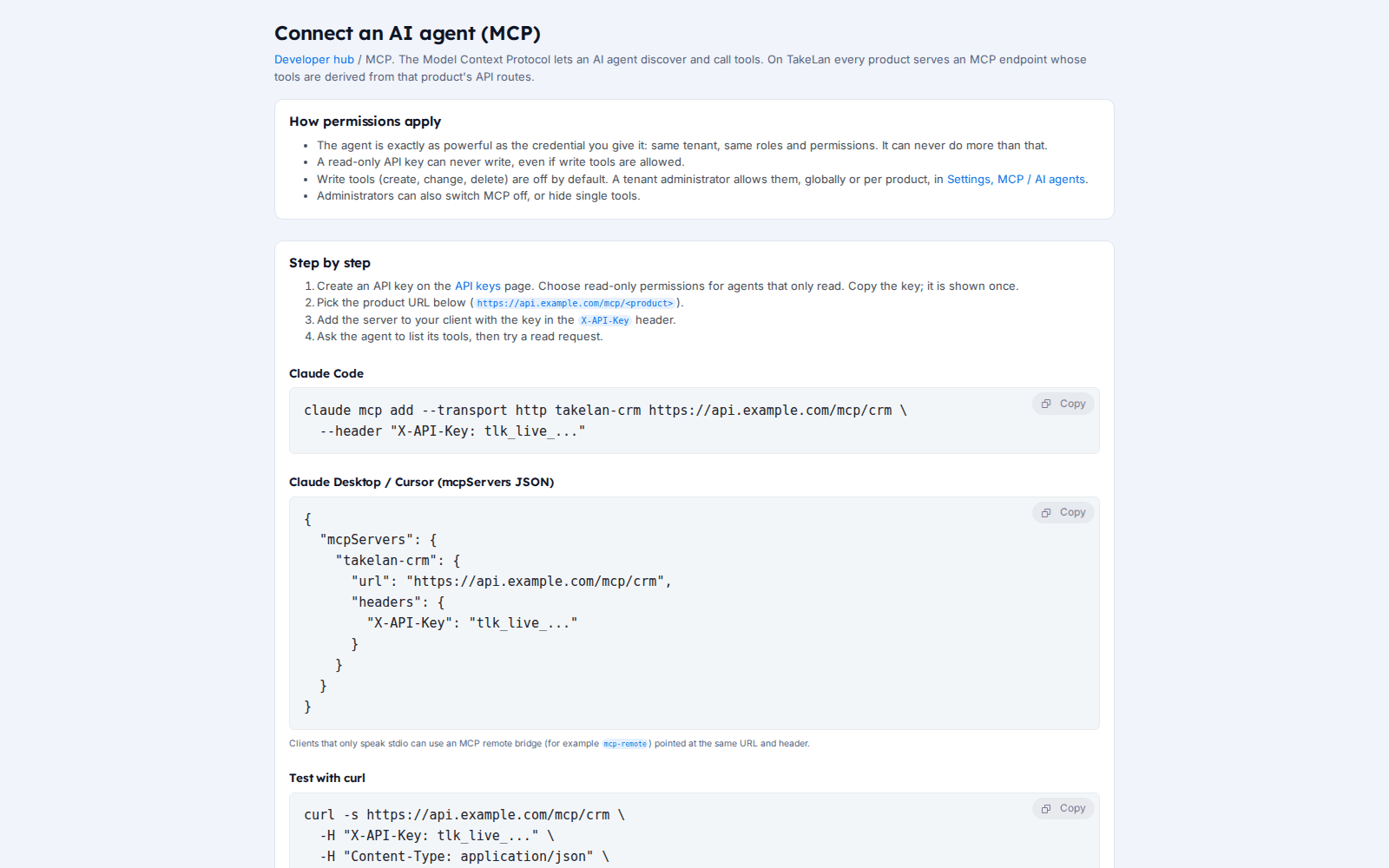
Connect your own AI tool over MCP. It is read-only until a tenant admin allows writes.
See how it works
The AI gateway
Ask your own knowledge
AI across the Cradle products
Who it is for
Give each client an AI budget
Set a budget per tenant so one busy client cannot drain the rest. Alerts tell you before the cap.
Keep AI inside the building
Register an on-prem pool and set on_prem_only. Use the ShadowCradle assistant with a model on your network, even in an air-gapped site.
One call, many models
Use the OpenAI-shaped endpoint, add a priority hint, and swap providers without changing your app.
Faster sales follow-up, still in your control
Customer Desk drafts emails and call scripts. Nothing goes out until a person approves the draft.
Works with
For ShadowCradle customers
ShadowCradle includes an optional RECO assistant. It is off by default. Point it at any OpenAI-compatible endpoint, including a model on your own network. It proposes actions, such as starting a backup job, and you confirm each one. With a local model it works fully air-gapped. An Airgap licence works without any Takelan connection. Firecradle has an opt-in assistant that uses your own key and needs internet. VCradle has no AI assistant.
Free* for connected organizations.
Takelan SSO is included when you connect. The link is optional and switched on in one place. The Airgap licence tier works without it. How this stays safe.
See the ShadowCradle side*Free within platform limits. Usage beyond limits may be charged to maintain the platform.
API, MCP and AI
Endpoints
POST /api/v1/ai/chat/completionsRouted OpenAI-shaped chat.POST /api/v1/ai/embeddingsCreate embeddings.PUT /api/v1/ai/tenant-policySet mixed or on_prem_only.PUT /api/v1/ai/tenant-budgetSet budget ceilings.POST /api/v1/knowledge/askAsk your documents.
Example
curl -X POST https://app.takelan.com/api/v1/ai/chat/completions -H "X-API-Key: $TAKELAN_API_KEY" -H "Content-Type: application/json" -d '{"messages":[{"role":"user","content":"Hello"}],"hints":{"priority":"cost"}}'MCP
AI calls count as writes over MCP, so they need the tenant writes switch and a key that is not read-only.
AI
- Prompts and results are stored with the request so you can read your history.
- The platform default model runs on Takelan-operated hosts. Bring-your-own sends data to the provider you chose.
- on_prem_only keeps gateway calls on your own pool. The Assistant and knowledge ask path do not follow it.
- Rate and budget refusals return 429 or 402 with a Retry-After header where it applies.
Security and trust
- Provider keys are kept in Takelan Secrets and never returned.
- Tenant isolation: your tenant comes from your token, and the body value is ignored.
- on_prem_only returns an error instead of falling back to a cloud provider.
- Assistant redaction happens in your browser first, and the server scrubs it again.
- Policy changes are recorded in the audit log.
See it
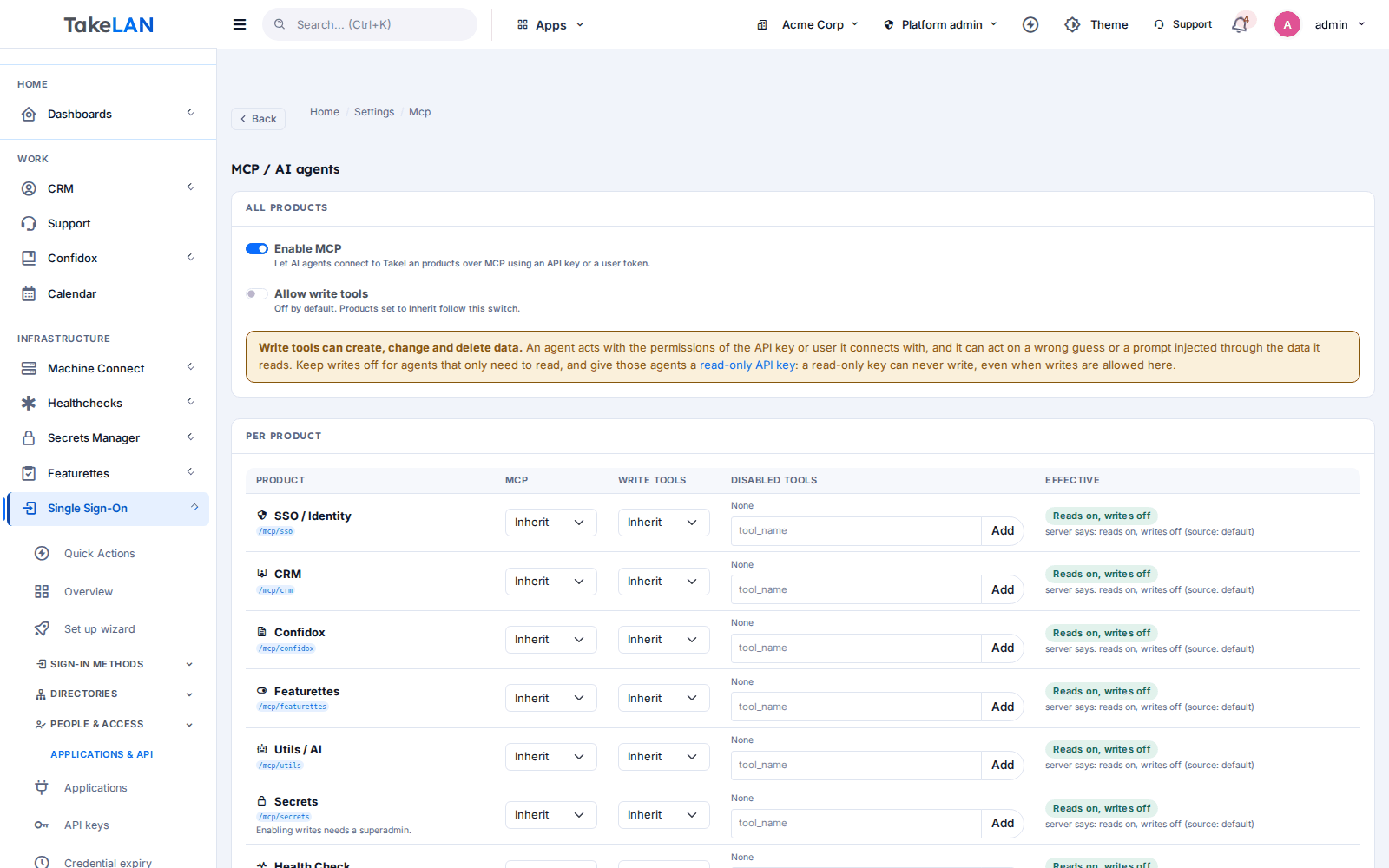
Choose which products agents can reach, per tenant.
Connect an agent with a short guide.
Affordable by design
Affordable by design. AI is optional and metered by your own budget. Connected ShadowCradle organizations start free*. *Free within platform limits; usage beyond limits may be charged to maintain the platform.
*Free within platform limits. Usage beyond limits may be charged to maintain the platform.
See pricingCommon questions
What is an AI gateway?
One endpoint that sits in front of many models. You call it once, and it picks the provider and model, with failover, budgets and logging. Takelan's gateway takes OpenAI-shaped requests.
Can I use my own OpenAI, Anthropic or Azure key?
Yes. Register the provider, and your key is stored in Takelan Secrets. Ollama and generic compatible endpoints work too.
How do I keep AI on premises?
Register an on-prem pool and set the routing policy to on_prem_only. Gateway calls then go only to that pool. Note that the Assistant and knowledge ask route do not follow this policy.
Are my prompts stored?
Yes. Requests keep the prompt, the result, tokens and cost so you can see history. There is no retention setting yet, so send only data you are happy to have stored.
Does my data leave the platform?
It depends on the route. With the platform default model, calls go to Takelan-operated hosts. With your own provider, they go to that provider. With on_prem_only, they stay on your pool.
How do I cap AI spend?
Set a tenant budget. Over the cap, calls are refused with HTTP 402 or 429, and alert events are recorded.
Can the Assistant answer from my own documents?
Yes. Add documents to the knowledge store and ask. Answers have numbered sources. Before page context leaves your browser, tokens, keys, emails, IPs and ids are removed and you see a preview.
Will the Customer Desk AI send emails by itself?
No. AI Sales Studio saves drafts only. A person approves them.
Does ShadowCradle have an AI assistant that works air-gapped?
Yes, optionally. RECO is off by default. Point it at any OpenAI-compatible endpoint, including a model on your network. It only proposes actions, and you confirm them.
Do all Cradle products have AI?
No. ShadowCradle and Firecradle each have an optional assistant. VCradle has none, though it has an MCP endpoint. Firecradle threat detection is rule-based and does not use AI.
More from the platform
Try AI on your terms
Start with the platform model, bring your own, or keep it on your own devices. Set a budget first.