
Takelan MCP servers: connect your AI agent to the platform and the appliances
Let your AI agent do the looking. You keep the keys.
Takelan publishes MCP servers for the platform, for Takelan Tunnels (Omnigate) and for the ShadowCradle and VCradle appliances. Your agent sees tools, runs them with your own permissions, and cannot write until you say so. Start free* if you use ShadowCradle.
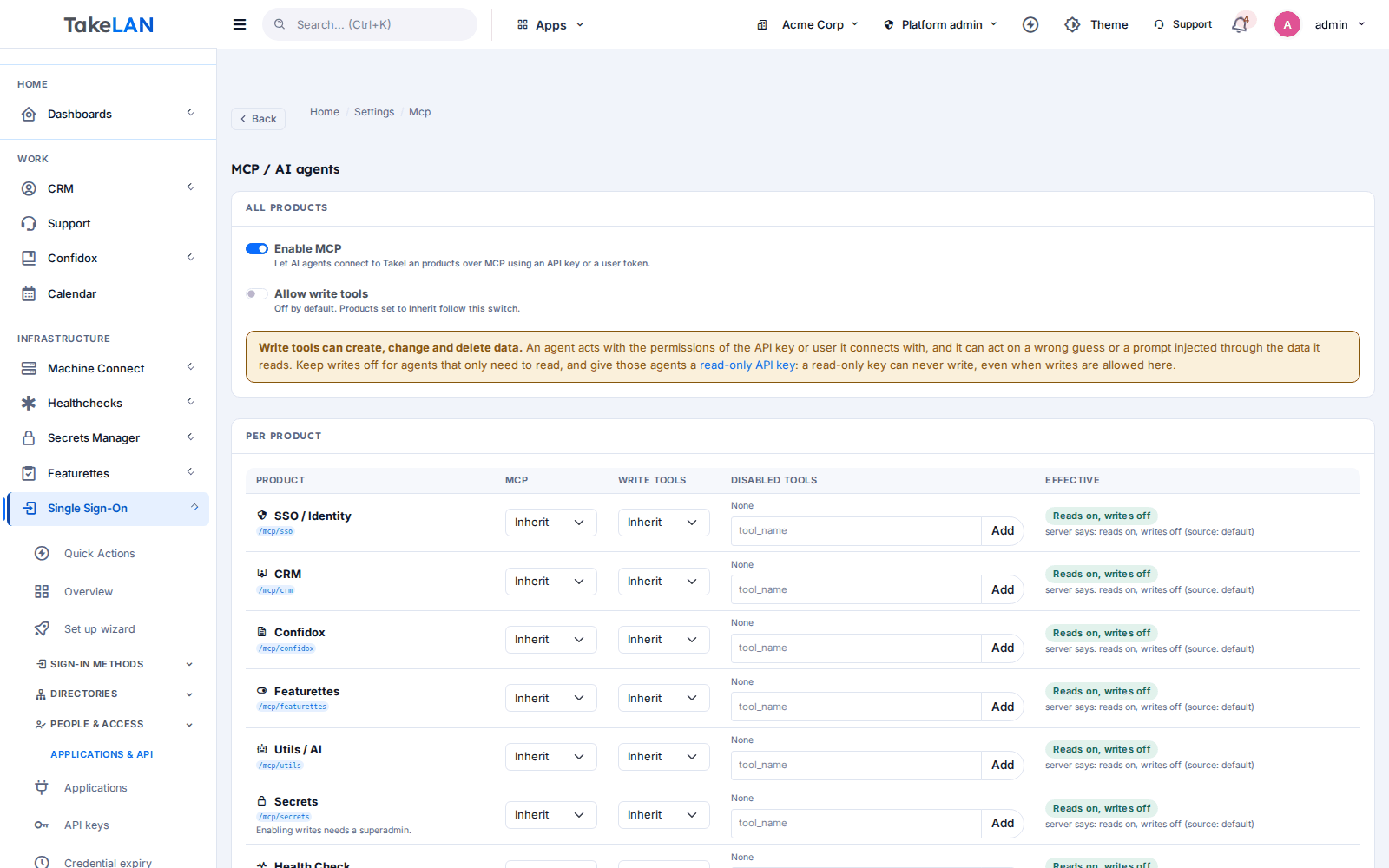
MCP is on for reading. Writes stay off until a tenant admin switches them on.
Why teams choose it
Read-only by default
An agent can look at your data from day one. It cannot change anything until a tenant admin turns writes on.
Your permissions, nothing more
A tool call re-enters the service with your own key or token. Roles, tenant scope and read-only keys all still apply.
Dangerous routes are never tools
Credential minting, decryption, remote command execution and tenant purge are left out, even with writes on.
Works with the clients you use
Streamable HTTP with JSON works with Claude Code and other MCP clients. One line adds a server.
Platform and appliances
One agent can check your tunnels, your CRM, your backup jobs and your VMs. Each server stays separate and small.
Affordable by design
MCP is included with the platform. Connected ShadowCradle organizations start free*.
What you can do
Takelan platform servers
- Eight product endpoints. POST https://app.takelan.com/mcp/<product> for sso, crm, confidox, featurettes, utils, secrets, healthcheck and machine-connect.
- Tools from the real API. Each tool maps to one route of the service, so the tool list follows the product. Call tools/list for the current list.
- Customer Desk drafting tools. Agents can leave drafts (playbooks, templates, sequences, call scripts) that a person approves in the CRM.
- Tools only. The platform servers offer tools. They do not offer resources or prompts.
Takelan Tunnels (Omnigate)
- Omnigate MCP. POST https://tnl.tkln.dev/mcp exposes dozens of tools. Most are reads. Destructive tools also need confirm set to true.
- Docs as resources. Omnigate also serves its own docs as MCP resources.
- Per-account write switch. Read-only by default. The owner turns writes on.
Appliances and Cradle cloud
- ShadowCradle appliance MCP. POST /api/v1/mcp on the appliance, with 19 tools: status, health, backup jobs and progress, protected systems, alerts, pools and snapshots, plus a few safe actions such as start or pause a backup job and create a snapshot.
- ShadowCradle cloud MCP. POST /api/v1/mcp on the Cradle cloud, with about 20 fleet tools: appliances, agents, alerts, organizations, licences and tickets. Scoped to the organizations you can access.
- VCradle MCP. POST /api/v1/mcp on the appliance, with 22 tools for VMs, containers, cluster, storage and snapshots. No stop, delete or migrate tools.
Safety and limits
- Tenant writes switch. Global and per-product switches, plus a per-tool disable list. If the policy service cannot be reached, the server refuses rather than guessing.
- Read-only API keys. A read-only key cannot write, even when the tenant allows MCP writes.
- Rate limits. Platform servers: 120 calls a minute per credential. Omnigate: 60 a minute per account. Over the limit returns HTTP 429.
- Size limits and timeouts. Requests are capped at 1 MB. Large replies are cut off. Calls time out after 30 seconds.
- Write calls are logged. The tool, the path and a credential fingerprint are logged. Bodies are not.
Discovery
- llms.txt. app.takelan.com/llms.txt lists the APIs and the MCP endpoints in a format agents can read.
- Per-product prompts and full docs. Generated docs per product for agents, plus Omnigate's ai.md.
How it works
Make a read-only key
Create an API key in Takelan SSO and mark it read-only. For an appliance, use a key or token from the appliance.
Add the server to your client
Use the URL for the product you want and send the key in a header. See the example below.
Ask for the tool list
Ask your agent to list the tools. The server tells it what is available to your key.
Ask a question
For example, "which backup jobs failed last night?" or "what is the status of my tunnels?".
Switch writes on only if you need them
A tenant admin can allow writes per product and disable single tools. Leave it off for safe browsing.
See how it works
Agents meet the platform
Safe by default
The product endpoints
Who it is for
A morning check across the fleet
Ask the cloud MCP which appliances are offline and which alerts are open across your organizations.
Triage a failed backup
Ask the appliance MCP for failed executions and progress of a running job, then start the job again after you approve it.
Explore an API by talking to it
Point your agent at /mcp/utils and ask for what is available. It builds calls from real tool descriptions.
Draft sales follow-ups with your agent
The Customer Desk MCP lets an agent create drafts. You review them in the CRM.
Works with
VCradle
Appliance MCP server.
For ShadowCradle customers
ShadowCradle appliances serve MCP at /api/v1/mcp. It works on your local network, so an air-gapped site can use it from a client that can reach the box. The ShadowCradle cloud has its own MCP for fleet questions. Connecting to Takelan is optional. An Airgap licence works without any Takelan connection. Firecradle has no MCP endpoint.
Included with connected ShadowCradle organizations.
Takelan SSO is included when you connect. The link is optional and switched on in one place. The Airgap licence tier works without it. How this stays safe.
See the ShadowCradle side*Free within platform limits. Usage beyond limits may be charged to maintain the platform.
API, MCP and AI
Endpoints
POST https://app.takelan.com/mcp/{product}Platform MCP. Product is sso, crm, confidox, featurettes, utils, secrets, healthcheck or machine-connect.POST https://tnl.tkln.dev/mcpOmnigate MCP.POST /api/v1/mcpShadowCradle appliance, ShadowCradle cloud and VCradle MCP, on their own hosts.
Example
# Add a server to Claude Code (placeholder URL and key)
claude mcp add --transport http takelan-utils https://app.takelan.com/mcp/utils \
  --header "X-API-Key: $TAKELAN_API_KEY"

# Other clients: a JSON config
{
  "mcpServers": {
    "takelan-utils": {
      "url": "https://app.takelan.com/mcp/utils",
      "headers": { "X-API-Key": "<your-api-key>" }
    }
  }
}

# Appliance (use a bearer token or key from the appliance)
claude mcp add --transport http shadowcradle https://<appliance>/api/v1/mcp \
  --header "Authorization: Bearer $TOKEN"
MCP
Streamable HTTP, JSON responses, tools only. POST only, and stateless. A GET returns 405. Use an API key or a user token. Service tokens are refused. Do not rely on a fixed tool count for platform servers. Ask tools/list.
- Platform tools run with the caller's own permissions and cannot widen them.
- Never exposed: credential create, rotate or reveal; password and 2FA reset; impersonation; tenant purge; decryption; remote command execution and file transfer.
- Treat everything an agent reads as untrusted input. Keep writes off unless you need them.
Security and trust
- Authentication is required. There is no anonymous access.
- A tool is the same route you could call yourself, run with your own key. RBAC, tenant scope and read-only keys apply unchanged.
- The write switch is off by default and fails closed.
- Tools that could reveal secret values, decrypted content or command output are hidden. Credential, decrypt and exec routes are never exposed.
- Settings for MCP itself cannot be changed through MCP.
- The appliance servers leave out delete, restore-over-live-data and reboot on purpose.
See it
Per-tenant MCP settings, writes off by default.
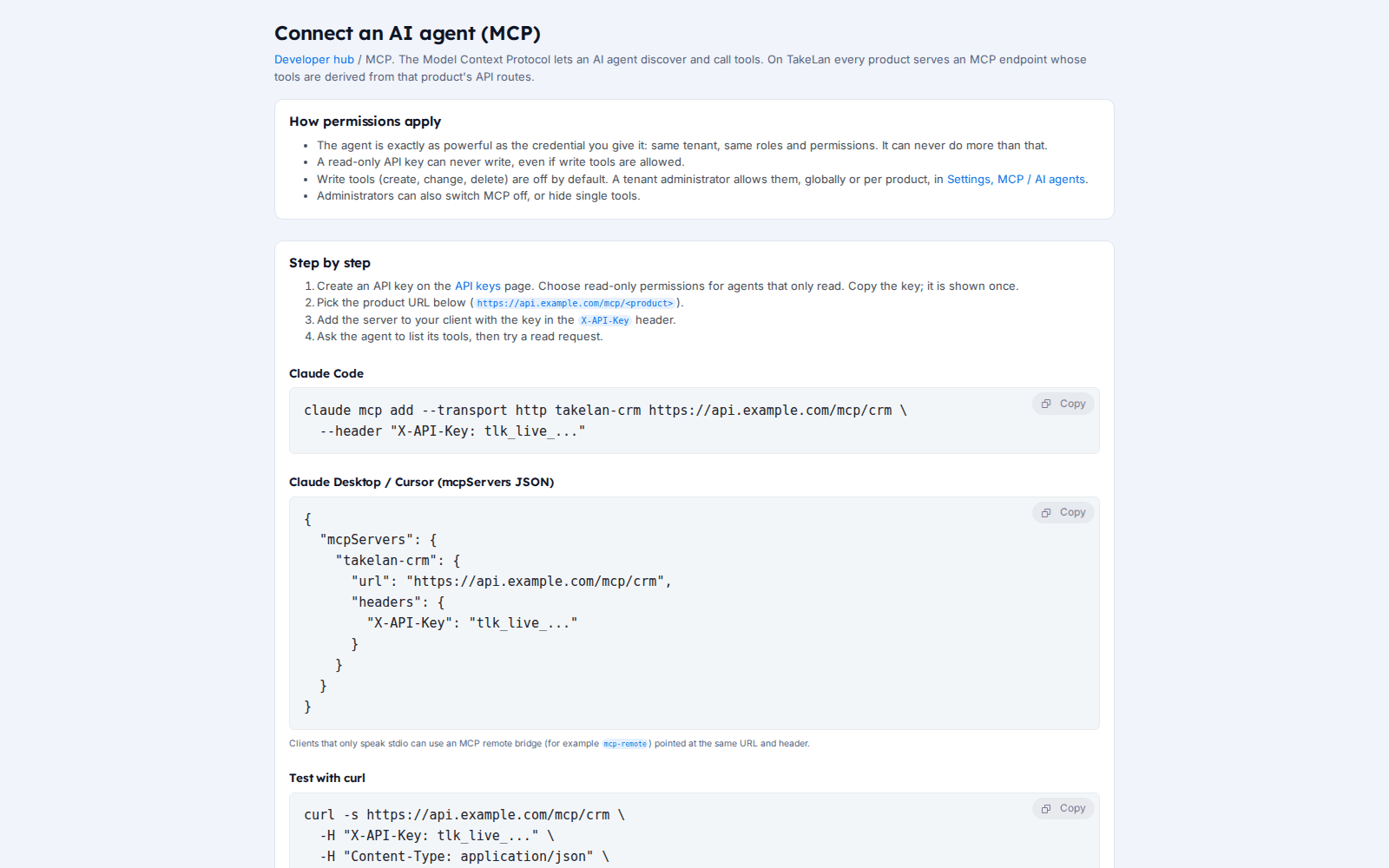
A short guide to connect an agent.
Affordable by design
Affordable by design. MCP is part of the platform. Connected ShadowCradle organizations start free*. *Free within platform limits; usage beyond limits may be charged to maintain the platform.
*Free within platform limits. Usage beyond limits may be charged to maintain the platform.
See pricingCommon questions
What is an MCP server?
MCP, the Model Context Protocol, is a standard way for AI tools to call functions in other systems. A Takelan MCP server exposes parts of a product as tools that your agent can call.
How do I connect Claude Code to Takelan?
Run claude mcp add with the transport set to http, the URL https://app.takelan.com/mcp/<product> and an X-API-Key header. Other clients use the same URL and header in their JSON config.
Can the agent change my data?
Not by default. Writes are off until a tenant admin turns them on, and read-only keys can never write. Some routes are never exposed at all.
Whose permissions does the agent use?
Yours. A tool call goes back into the service with your own key or token, so roles, tenant scope and rate limits still apply.
Which products have MCP?
The platform products sso, crm, confidox, featurettes, utils, secrets, healthcheck and machine-connect, plus Omnigate, the ShadowCradle appliance, the ShadowCradle cloud and VCradle. Firecradle does not.
What are the rate limits?
Platform servers allow 120 calls a minute per credential. Omnigate allows 60 a minute per account. Past the limit you get HTTP 429.
Can the agent read my secrets?
No secret values are returned through the default tools. Tools that could reveal secret values or decrypted content are hidden.
Does it need OAuth?
No. Use an API key or user token in a header.
Can I use it offline or air-gapped?
The ShadowCradle appliance MCP works on your local network with a client that can reach the box. The platform servers need access to Takelan.
How do agents find the docs?
Through llms.txt at app.takelan.com/llms.txt, per-product prompts, and Omnigate's ai.md.
More from the platform
Give your agent a seat, not the keys
Make a read-only key, add one server and ask your first question.