
A secrets manager for API keys, passwords and disk keys
Stop keeping secrets in chat, spreadsheets and .env files.
Takelan Secrets Manager keeps API keys, passwords and disk keys encrypted, versioned and logged. You decide who can read each one, from which network, and for how long. Start free*, and stay affordable as you grow.
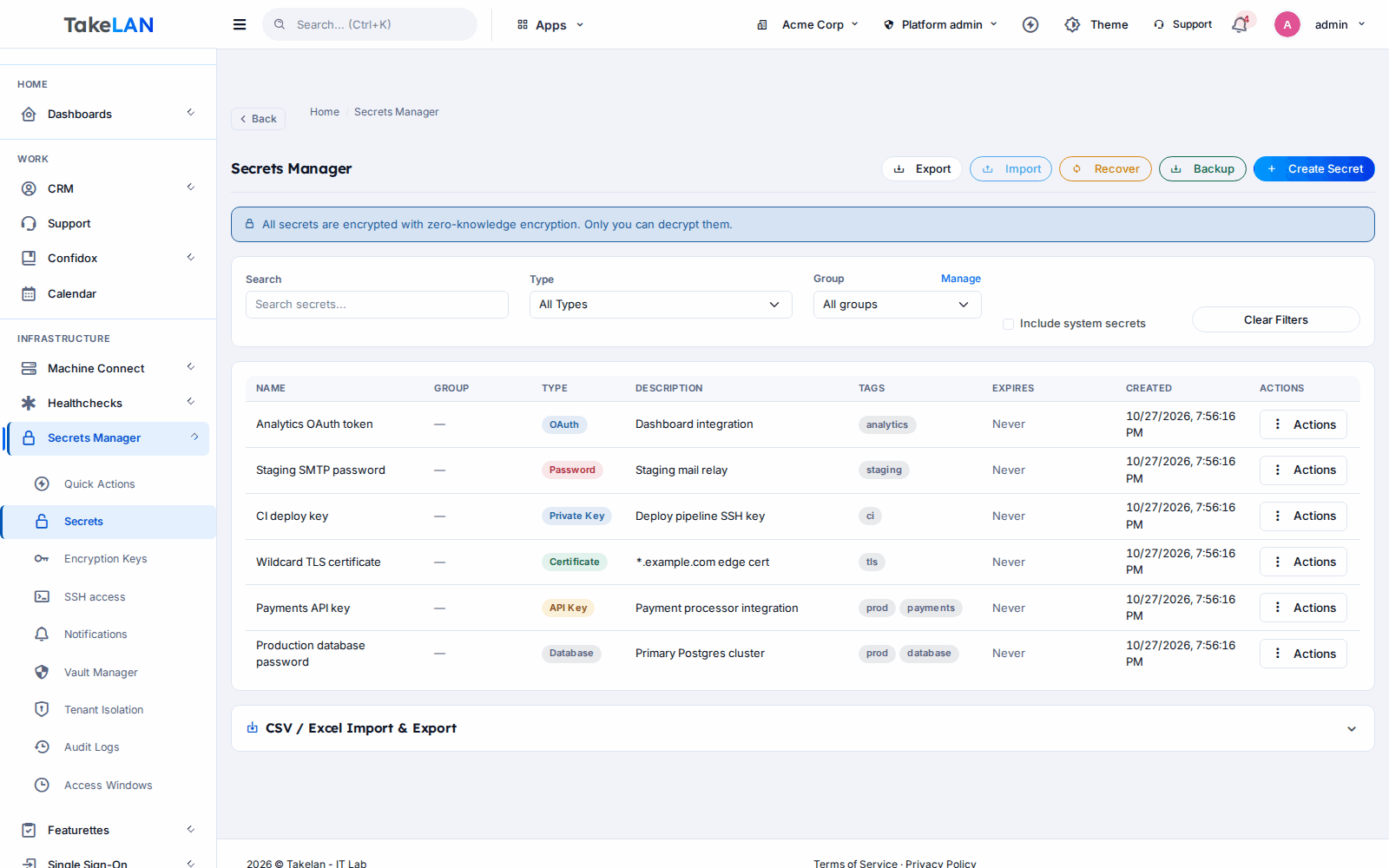
Every secret in one place, with tags, groups and expiry dates.
Why teams choose it
Encrypted at rest, by default
Each secret gets its own random data key. That key is wrapped under a key made for your organization only, using AES-256-GCM.
Change a secret without fear
Every change is a new version. Promote one, roll back to an older one, or clean up old versions when you are done.
Only the right people see each value
Grant access entry by entry, keep admin passwords in a private vault, and limit reads to approved IP addresses.
An audit trail you can check
The vault audit log is a hash chain. Run a verify and it tells you the first entry that was changed or removed.
Expiry notices before things break
Set an expiry date. You get alerts at seven days, one day and when it has passed, by email, Slack or PagerDuty.
Easy to adopt, affordable by design
Sign in with Takelan SSO, import a CSV, and use the API, the Python SDK or an AI assistant over MCP. Start free*.
What you can do
Encryption
- AES-256-GCM envelope encryption. A random key per secret, wrapped under a per-organization key.
- Organization isolation. Every secret belongs to one tenant, and tests check that tenants cannot see each other.
- Server-held master key. The platform holds the master key, so the service can decrypt for you when you ask. This is not zero-knowledge.
- Encrypted backups. Tenant backups and exports keep secrets as ciphertext.
Secrets and versions
- Secrets with tags and groups. Create, edit, tag, group and move secrets in bulk.
- Versions with staging labels. Label a version, promote it, restore an old one, or clean up the rest.
- Expiry dates. Give any secret an expiry date and get notices before it lapses.
- File upload and download. Keep certificates and key files next to the text secrets.
- CSV import and export. Move in fast. Values only leave in an export when you explicitly allow it.
Access control
- Per-entry access control. Grant individual users access to a single vault entry.
- Private vaults. A vault with its own members. Administrators of the organization are locked out of its contents.
- Default policy for the tenant. Set what new entries start with, then adjust per entry.
- IP allow lists. Limit value reads on a secret or key to the networks you name.
- Read-only API keys. Give a script an API key that can read but never change.
- Emergency disable for a key. Mark a key compromised and shut it off at once.
Keys and disk encryption
- Generic, uploaded, LUKS and BitLocker keys. Store the keys that protect disks, with setup helpers for LUKS and BitLocker.
- Key rotate, history and restore. Rotate a key, see its history, and restore an earlier version.
- Customer seeds. Derive a separate key for each of your customers from one seed. Rotate one or all.
- Usage log per key. See who used a key and when.
Audit, alerts and backup
- Hash-chained, tamper-evident audit log. Each entry records the outcome, IP address, user agent and request, and commits to the one before it.
- Verify and export. Run a chain check, and export the log as CSV or JSON.
- Alert channels per organization. Send notices to email, Slack or PagerDuty.
- Expiry alerts. Notices at seven days, one day, and when a secret has expired.
- Tenant backup and restore. Export an organization and restore it later. Ciphertext stays ciphertext.
- Tenant purge. Remove an organization's data when it leaves.
Rotation and automation
- Webhook rotation. Define a rotation that calls your webhook. Calls to private addresses are refused and redirects are not followed.
- Rotation history and templates. Keep a record of each rotation and reuse settings.
- Python SDK. Read and write secrets and keys from Python with tksecretsmanager_sdk.
- REST API. Everything in the app is available over the API with an API key or SSO token.
How it works
Sign in and create a vault
Use Takelan SSO. Your organization gets its own space. Import a CSV or add secrets one by one.
Add secrets and set the rules
Tag and group them. Add an expiry date. Name the IP addresses allowed to read a value. Share a single entry with one person, or keep it in a private vault.
Use them from your code
Fetch a value with the API, the Python SDK or an AI assistant over MCP. Use a read-only API key for scripts.
Change them safely
Add a new version, promote it, and roll back if something fails. Rotate through a webhook when a service supports it.
Check the trail
Open the audit log, filter it, export it, and run verify to confirm the chain is intact.
See how it works
How a secret is encrypted, read and versioned
Who can see what
How ShadowCradle uses it
Who it is for
One vault per client, one key per client
An MSP onboarding a new client adds their admin passwords and disk keys to a private vault. When a technician leaves, no password has to be guessed: you check the audit log and rotate what they touched. Customer seeds give each client a separate derived key.
Disk keys that survive a lost laptop
Store LUKS and BitLocker keys in one place, tied to an IP allow list. When a drive needs unlocking, the read is logged with who, when and from where.
Stop shipping .env files
Keep API keys in the vault and read them with a read-only API key or the Python SDK. A new version goes live when you promote it, and you can roll back in one step.
No more shared spreadsheets
Move passwords out of the spreadsheet with a CSV import. Give each person only the entries they need. Get an email before a licence key or certificate expires.
Works with
For ShadowCradle customers
ShadowCradle has its own key manager for backup encryption keys. If you opt in to Takelan custody, a copy of those keys is escrowed in Secrets Manager, so a lost appliance does not mean lost data. ShadowCradle relays the copy to Takelan over an encrypted connection and never stores it: only Takelan holds the escrowed keys, and every disk key is wrapped per tenant. Keys marked customer-managed are never sent to Takelan. Backup agents and appliances can also escrow their disk keys, vault passphrases and credentials the same way. The agent's own encryption key is escrowed by default when paired. Passphrase and S3 credential escrow are off until you turn them on. Recovery is a two-step process, and the key itself is never handed back. Airgap installs work without any of this.
Free* for connected ShadowCradle organizations, and optional with one switch.
Takelan SSO is included when you connect. The link is optional and switched on in one place. The Airgap licence tier works without it. How this stays safe.
See the ShadowCradle side*Free within platform limits. Usage beyond limits may be charged to maintain the platform.
API, MCP and AI
Endpoints
GET /api/v1/secretsList secrets.POST /api/v1/secretsCreate a secret.GET /api/v1/secrets/{id}/valueRead a value. The IP allow list is checked here.GET /api/v1/secrets/{id}/versionsList versions and their labels.POST /api/v1/keysCreate a key.POST /api/v1/keys/{id}/rotateRotate a key.GET /api/v1/vault/auditRead the vault audit log.
Example
curl -H "Authorization: Bearer $TAKELAN_API_KEY" \
  https://<your-takelan-host>/api/v1/secrets
MCP
The endpoint is /mcp/secrets. An AI assistant signs in with a Bearer token or API key and gets the same tools as the API, with the caller's own permissions. Writes are off until your organization turns them on. Routes that return secret values, key material or exports stay hidden unless your organization names them on an allow list. Audit export and the SSH agent routes are never exposed.
- Python: install tksecretsmanager_sdk for secrets, keys, rotation, and LUKS and BitLocker helpers. It is a synchronous client.
- There is no command-line tool. Use the API or the SDK.
Security and trust
- AES-256-GCM envelope encryption: a random key per secret, wrapped under a key derived for your organization with PBKDF2-SHA256 at 600,000 rounds.
- The platform holds the master key. Secret values can be decrypted by the service. This is not a zero-knowledge design.
- Tenant isolation is enforced on every call and covered by tests.
- The vault audit log is tamper-evident. A verify call finds the first entry that does not match. It is not tamper-proof, so keep an external copy if you need strong proof.
- Read-only API keys, IP allow lists and per-entry grants limit what each caller can do.
- Webhook rotation refuses private addresses and does not follow redirects.
See it
The secrets list.
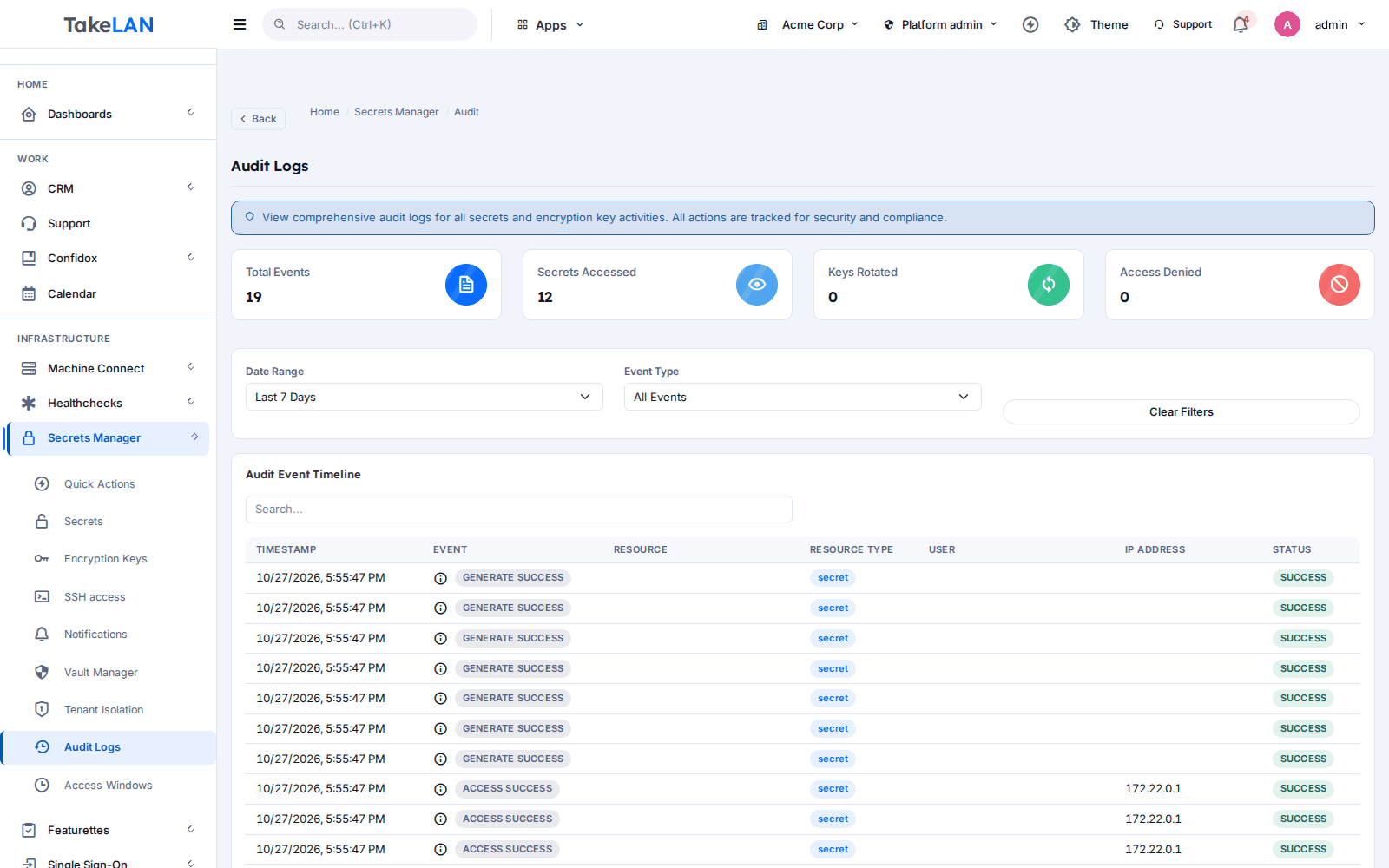
The audit log and chain check.
Affordable by design
Affordable by design. Start free* on the Takelan platform, then pay only for what you use beyond platform limits. There is nothing to host yourself.
*Free within platform limits. Usage beyond limits may be charged to maintain the platform.
See pricingCommon questions
What is a secrets manager?
It is a safe place to keep API keys, passwords, certificates and disk keys. Instead of pasting them into chat or config files, you store them once, control who can read them, and keep a record of every read.
How are secrets encrypted?
With AES-256-GCM. Each secret has its own random data key. That key is wrapped under a key made for your organization from a platform master key. Backups of an organization stay encrypted.
Is Takelan Secrets Manager zero-knowledge?
No. The platform holds the master key and can decrypt a secret when an authorised caller asks for it. That lets the service apply access rules, show values in the app and restore backups. Tenant isolation and access control protect your data from other customers and other users.
Can I roll back a secret to an older value?
Yes. Every change creates a new version. You can label versions, promote one to be the current value, restore an earlier one, and clear out old versions.
Does it rotate passwords automatically?
Not on its own. You can define a rotation that calls your webhook, and you can list what is due.
Can I limit a secret to certain IP addresses?
Yes. Add an IP allow list to a secret or key. Reads of its value from other addresses are refused.
How does the audit log prove nothing was edited?
Each entry includes a hash of the one before it. A verify call recomputes the chain and reports the first entry that was changed or removed. It makes tampering detectable. It does not make tampering impossible, so export the log if you need an outside copy.
Can I use it with AI assistants?
Yes, over MCP at /mcp/secrets. The assistant acts with the caller's permissions. Writes are off until your organization allows them, and routes that return secret values stay hidden unless you allow them.
Can I use it without ShadowCradle?
Yes. Sign in with Takelan SSO and use it on its own. ShadowCradle customers who connect their organization can use it as one of the free* services with one switch. Airgap licences work without any Takelan connection.
Where does it cost money?
It is free* within platform limits. Usage beyond those limits may be charged to keep the platform running. Pricing is affordable by design.
Move your secrets somewhere safer today.
Start free*, import a CSV, and set your first IP allow list in minutes.