
Takelan for developers: one token, every API, tools for your agents
One token. Every API. Zero glue code.
Sign in once, create a key and call everything from one origin. APIs for your code. Tools for your agents. Start free* if you use ShadowCradle.
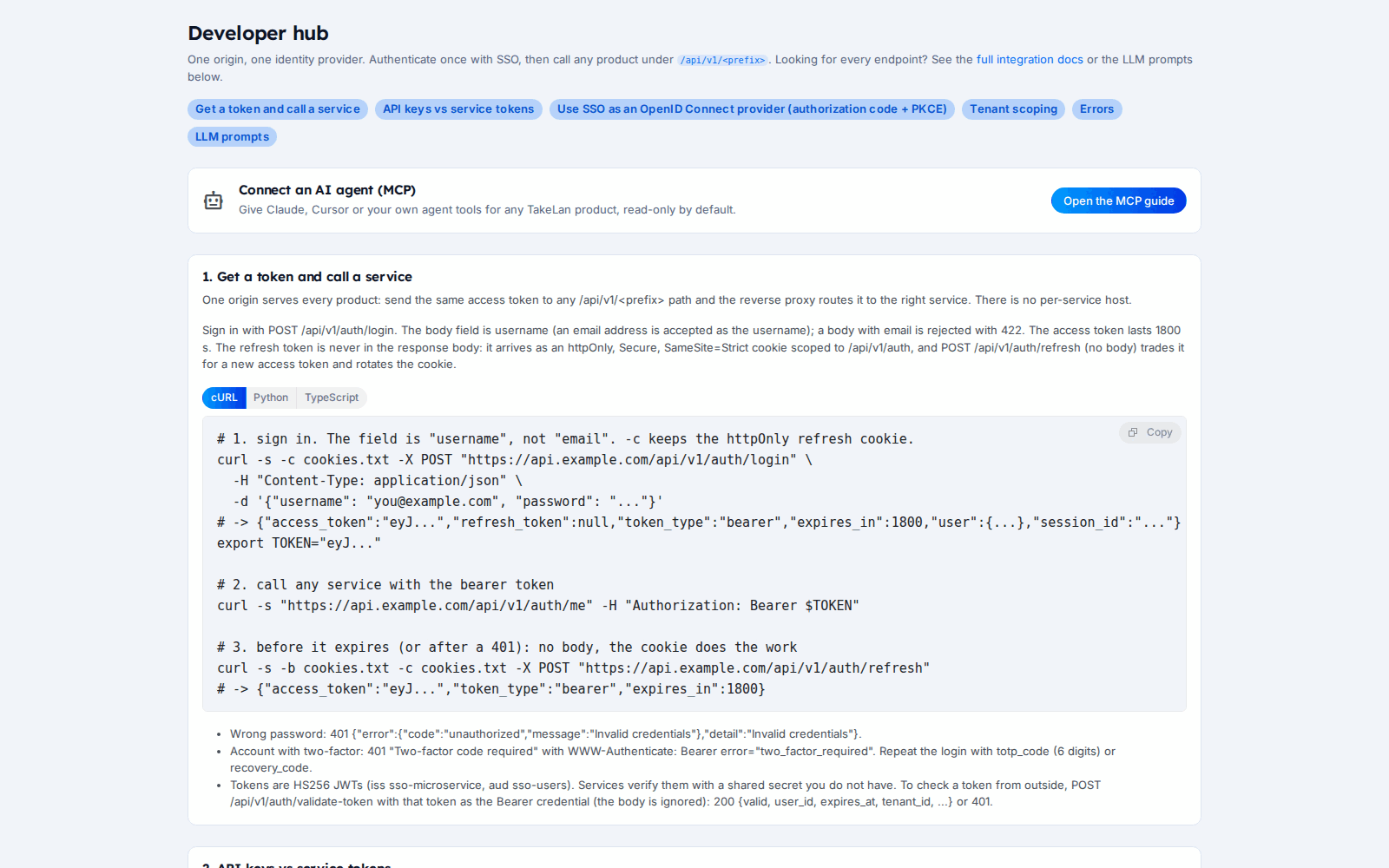
The developer hub: quickstart, keys and OIDC.
Why teams choose it
Four ways to authenticate
Use an SSO bearer token, an X-API-Key, a service token, or OIDC with PKCE. Pick what fits the job.
Revoke a key and it stops
Keys are checked against SSO on every request, with a very short cache. Revocation takes effect within seconds.
Clear errors you can act on
Standard HTTP codes with a clear reason. Budget refusals are different from outages.
Signed webhooks
HMAC-SHA256 signatures, retries with backoff and replay of failed deliveries.
A catalog, not a scavenger hunt
Every API family has a page with routes and examples.
Affordable by design
Start free*. Beyond platform limits, pricing stays affordable so a side project can grow.
What you can do
Authentication
- SSO bearer token. Sign in with the login endpoint and send the access token as a bearer. Access tokens last 30 minutes. A refresh cookie renews them.
- API keys (X-API-Key). For scripts and servers. Keys can be read-only, restricted by IP or schedule, and capped by usage.
- Service tokens. Server-to-server tokens for backends, scoped by an allow-list. Not accepted on MCP.
- OIDC with PKCE. Use Takelan as the identity provider for your own app, with discovery and JWKS.
- Tenant from the token. Your tenant comes from your token only. A tenant id in a body is ignored.
Reliability and limits
- Fast key revocation. Keys are verified against SSO on each request with a few seconds of cache, and revocations are pushed out. If SSO is down the request fails with 503. It never fails open.
- Rate limits. Over the limit returns HTTP 429 with a Retry-After header. MCP allows 120 calls a minute per credential. Other limits vary by route, so read the headers.
- Error codes. 401 not signed in, 402 AI budget used, 403 not allowed or model locked, 413 too large, 422 invalid input, 429 slow down, 503 dependency unavailable.
- Idempotency keys. AI requests accept an idempotency key that is remembered for 24 hours.
Webhooks
- Signed delivery. Each call carries an X-Signature-256 header, an HMAC-SHA256 of the body.
- Retries and replay. Backoff retries, and dead jobs can be replayed.
- Where webhooks exist. SSO events, Utilities notifications, and async AI results.
Docs and discovery
- API catalog. One page per Utilities API family with real routes and examples.
- llms.txt and generated prompts. app.takelan.com/llms.txt and per-product prompts, plus full docs in markdown.
- SSO OpenAPI file. The public site publishes the SSO OpenAPI file. Each running service also serves its own docs.
- Copyable prompts for coding assistants. The web app has integration prompts you can paste into an LLM.
MCP and AI
- MCP servers. Platform products at /mcp/<product>, plus Omnigate and the appliances.
- AI Gateway. OpenAI-shaped chat, batch and embeddings with your own providers.
- Knowledge store and Assistant. Ask your documents with numbered sources.
SDKs
- Featurettes JavaScript SDK. Ready for use.
How it works
Create an account
Sign up for Takelan, or use the account from your connected ShadowCradle organization.
Create an API key
In SSO, create a key. Make it read-only for scripts that only look things up.
Make a call
Send X-API-Key to the route you want. Every family is on the same origin.
Add webhooks or OIDC
Register a signed webhook for events, or register an app and use authorization code with PKCE.
Connect your agent
Add an MCP server, or point your assistant at llms.txt.
See how it works
Four ways in, one API
A signed webhook, round trip
Who it is for
Add login to an internal app
Register the app and use authorization code with PKCE. You get two-factor sign-in and roles for free.
Script a report across clients
Use a read-only key to pull data for each client tenant and build a monthly report.
Automate alerts
Publish an event once and let notifications send it to Slack or PagerDuty with signed webhooks.
Ask your tools questions
Connect an MCP client with a read-only key and let your assistant look at your data.
Works with
For ShadowCradle customers
Connected ShadowCradle organizations can use Takelan SSO and the free* services with one switch. It is optional. An Airgap licence works without any Takelan connection.
Free* for connected organizations.
Takelan SSO is included when you connect. The link is optional and switched on in one place. The Airgap licence tier works without it. How this stays safe.
See the ShadowCradle side*Free within platform limits. Usage beyond limits may be charged to maintain the platform.
API, MCP and AI
Endpoints
POST /api/v1/auth/loginSign in and get an access token.POST /api/v1/api-keysCreate an API key. The key is shown once.POST /oauth2/tokenOIDC token endpoint.GET /.well-known/openid-configurationOIDC discovery.
Example
curl -H "X-API-Key: $TAKELAN_API_KEY" https://app.takelan.com/api/v1/ai/models
MCP
See the MCP page for connection steps.
- Bearer also works with an API key. If both are sent, X-API-Key is used.
- Run your own tests. Rate limits can differ between routes.
Security and trust
- Key values are shown once, when you create the key.
- API keys can be read-only, restricted and capped.
- Revocation takes effect within seconds.
- If SSO is unreachable, requests fail with 503 rather than letting anyone through.
- Webhook bodies are signed with HMAC-SHA256.
See it
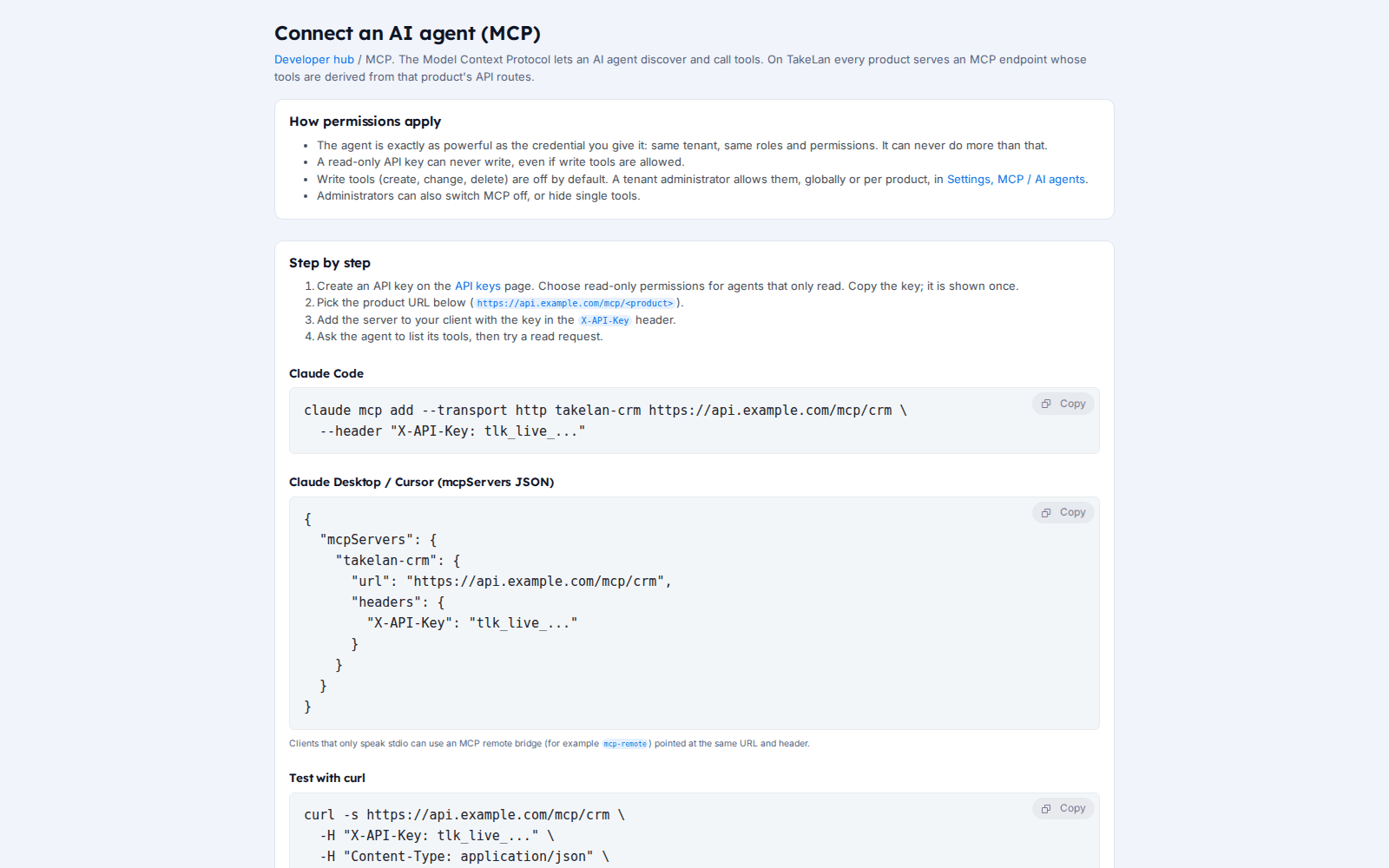
Connect an AI agent through MCP.
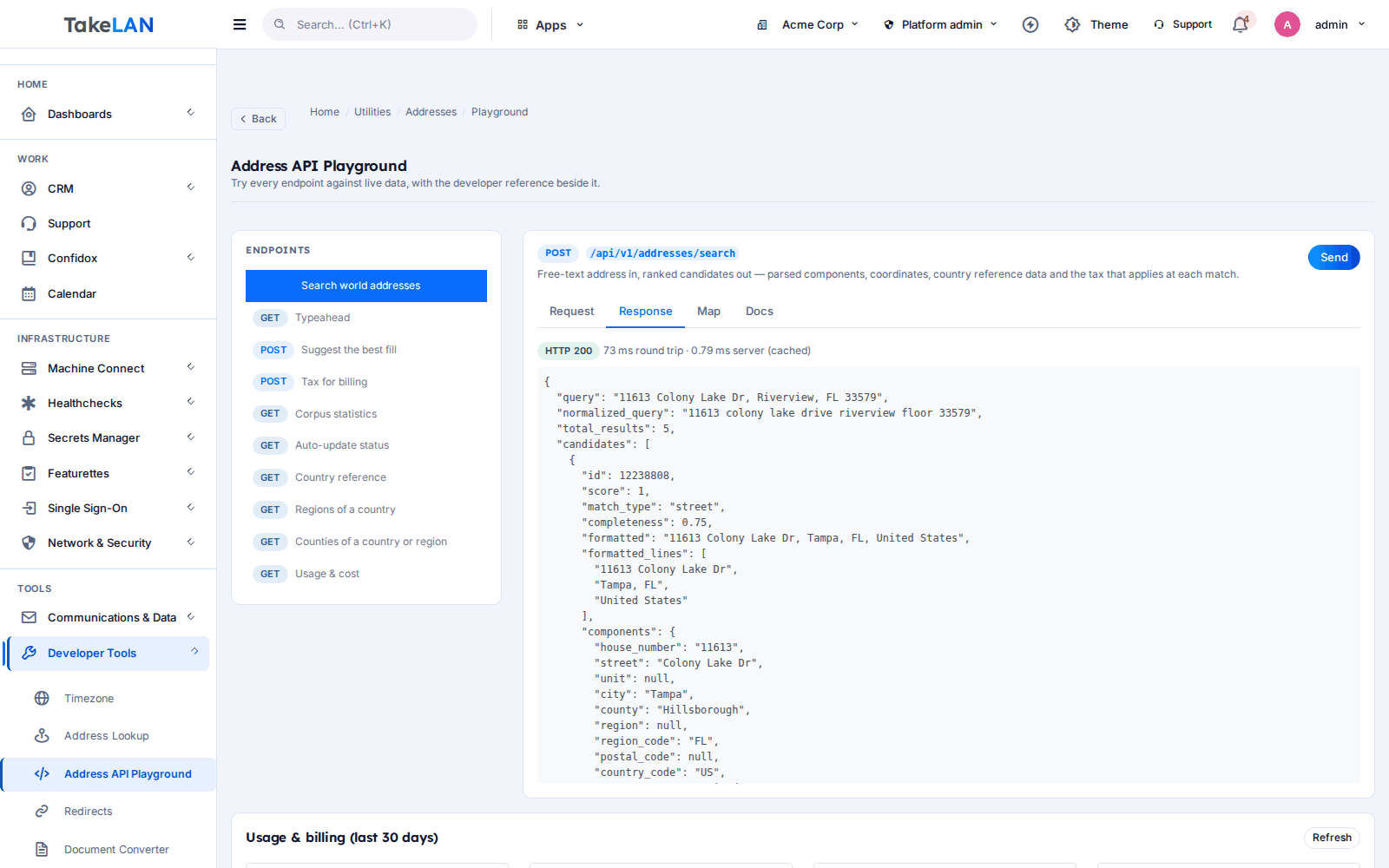
Try an API from your browser.
Affordable by design
Affordable by design. Start free* and pay only if you grow past platform limits. *Free within platform limits; usage beyond limits may be charged to maintain the platform.
*Free within platform limits. Usage beyond limits may be charged to maintain the platform.
See pricingCommon questions
How do I authenticate to the Takelan API?
Use a bearer token from the login endpoint, an API key in X-API-Key, a service token for servers, or OIDC with authorization code and PKCE for apps.
What is the difference between an API key and a service token?
An API key acts for a user or tenant, and can be read-only. A service token is for server-to-server calls with a scope allow-list. Service tokens are not accepted on MCP.
How fast does a revoked API key stop working?
Within seconds. Keys are checked against SSO on every request with a very short cache, and revocations are pushed out.
What are the rate limits?
They vary by route. Over the limit you get HTTP 429 and a Retry-After header. MCP allows 120 calls a minute per credential. We do not publish a single number for everything.
What do the error codes mean?
401 not signed in, 402 AI budget used, 403 not allowed or model locked, 413 body too large, 422 invalid input, 429 slow down, 503 a dependency such as SSO is unavailable.
How do I verify a signed webhook?
Compute HMAC-SHA256 of the raw body with your subscription secret and compare it with the X-Signature-256 header. Use the X-Request-Id header to deduplicate.
Where is the API catalog?
The Utilities & APIs page lists every family, and each has a page with routes and examples.
Are there SDKs?
Featurettes has a JavaScript SDK ready, and six more in progress. There is no Utilities or AI SDK yet. Use plain HTTP.
Can I use Takelan as an OIDC provider for my app?
Yes. Register an application, use discovery and JWKS, and run authorization code with PKCE.
Is there documentation for AI assistants?
Yes. llms.txt at app.takelan.com/llms.txt, per-product prompts and full markdown docs. MCP servers are described on the MCP page.
More from the platform
Make your first call in minutes
Create a key, call a route, and wire up a webhook. Then let your agent in over MCP.