
Machine Connect: Linux device management for your whole fleet
Manage every Linux machine like it is enrolled in a modern device-management system.
Machine Connect is Takelan’s Linux device management (MDM). Enroll machines with Takelan SSO, see what is installed, allow only the apps you trust, and lock a device with an action it can prove came from you. It is not remote access.
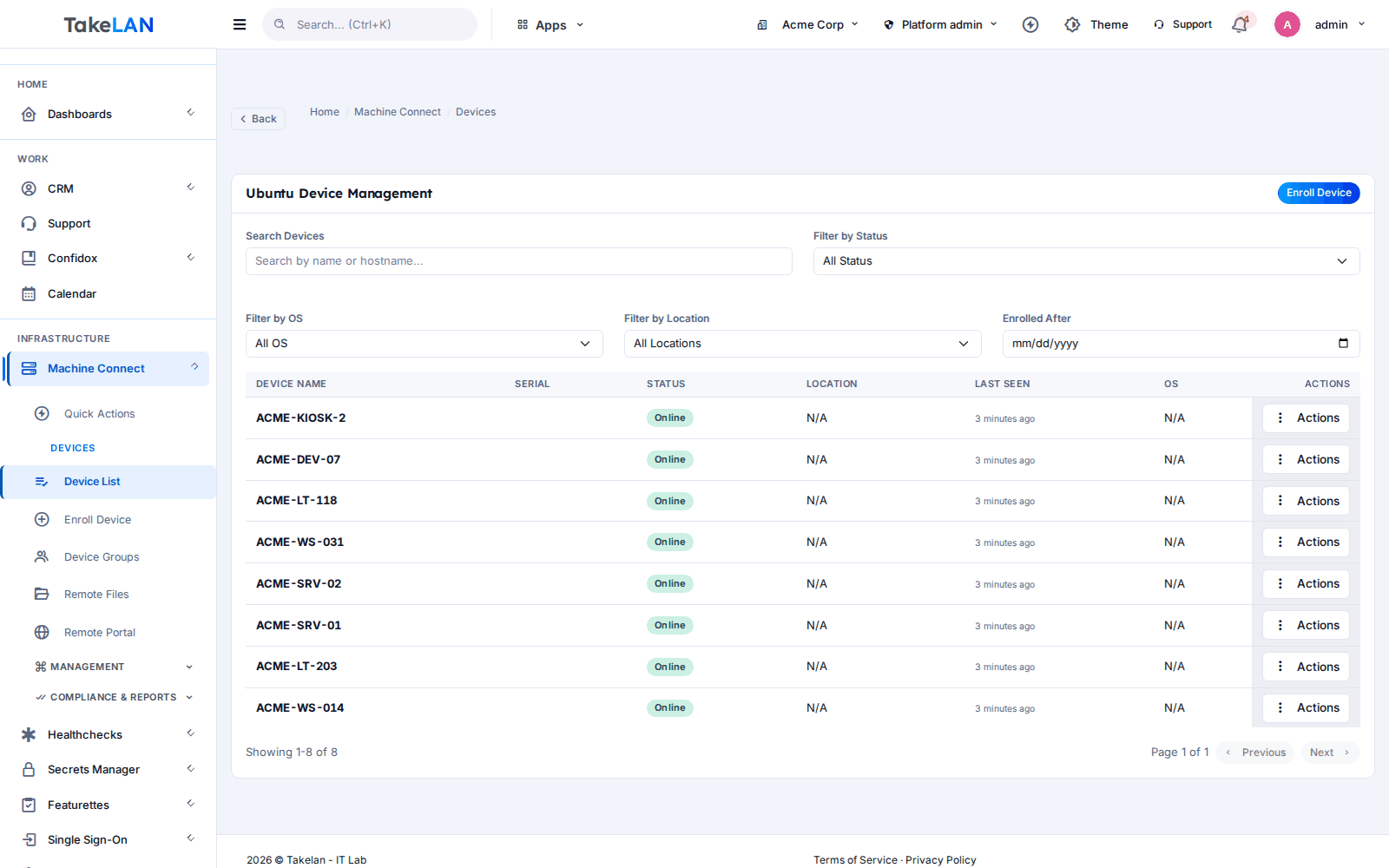
The device list: every enrolled Linux machine and its posture in one place.
Why teams choose it
Lose a laptop, not your data
Lock a device from the console. The machine locks the screen, can cut network traffic to an allow-list, and can disable USB devices. If you lose contact, a dead-man timer can unlock it again.
Only trusted apps run
Application control starts in audit mode, so you see what would be blocked before you block it. Then switch to enforce. Rules match by file hash, path, name or user.
See your risk, not just your inventory
Software inventory from the system package managers is matched against known CVEs and rolled into a risk score per device. Fix the worst machines first.
Proof for every action
Each action sent to a device is signed and bound to that device, that action and an expiry. The device keeps a hash-chained local audit log you can verify.
Start with the login you have
Devices enroll through Takelan SSO. No separate enrollment tokens to hand out, and no new directory to build before you can begin.
Affordable by design
Machine Connect is part of the Takelan platform, which is built to be affordable and easy to start. Contact us for terms.
What you can do
Enroll and identify
- Enroll through Takelan SSO. A person signs in on the device. Takelan SSO issues the enrollment, so there are no loose enrollment tokens.
- A key per device. Each device gets its own Ed25519 key and certificate and proves it holds the key when it enrolls.
- Groups and tenant separation. Organize devices into groups. Each organization sees only its own fleet.
- Extra confirmation for risky actions. Destructive actions ask the admin to confirm again with a step-up check.
- Sessions you can revoke. When an admin session ends or is revoked in SSO, the console stops trusting it.
Lock and unlock
- Signed lock and unlock. Lock and unlock are signed actions the device checks before it acts.
- Screen lock and login block. A locked device shows a locked screen and blocks new logins.
- Network allow-list while locked. A locked device can drop outbound traffic except to the addresses you allow, using the host firewall.
- USB lockdown. Disable USB devices on a locked machine.
- Dead-man auto-unlock. If the machine loses contact for too long, it can unlock itself so a mistake does not strand a user.
Application control
- Audit mode first. See which programs a rule would block before it blocks anything.
- Enforce mode. The device blocks programs at launch that do not match your policy.
- Hash, path, name and user rules. Allow or deny by file hash, path, file name or user ID.
- Lock-out protection. A policy that would brick the machine is refused instead of applied.
Packages, scripts and firewall
- Package install, remove and upgrade. Send apt package actions to a device or group, with allow and deny lists.
- Signed scripts. Scripts are signed and pinned to their SHA-256 hash. Devices run them only if they opted in, in a sandboxed child process.
- Scheduled script runs. Run a script on a schedule and read the run history.
- Host firewall rollout. Push a firewall configuration to devices. A dead-man rollback restores the old rules if the new ones cut the device off.
Inventory and risk
- Software inventory. Read installed software from dpkg, rpm, apk, snap and flatpak.
- CVE matching. Installed software is matched against known vulnerabilities through the Takelan Utilities CVE data.
- Risk score per device. See which machines carry the most risk, in a risk dashboard.
- Posture checks. Heartbeats report disk encryption, firewall state and pending updates.
File browser through a relay
- Device dials out. The device opens an outbound connection to the relay. You open no inbound ports on the machine.
- Confined to the folders you allow. File operations are confined with kernel path checks, symlinks are refused, and a deny list covers sensitive paths.
- Encrypted between device and console. The device side uses X25519, Ed25519 and ChaCha20-Poly1305.
A small, careful agent
- Rust agent: takelan-agent. An unprivileged service that talks to the console.
- Root helper: takelan-priv. A separate small helper does the few things that need root. The agent cannot do them on its own.
- tlmdm command line. Register, check status, read the app-control gate and verify the audit log from the machine itself.
- Hash-chained audit log. Run tlmdm audit-verify to check that the local log was not edited.
AI that can look, not touch
- MCP endpoint at /mcp. Connect an AI assistant to read fleet state: devices, groups, inventory, risk and more.
- Read tools by default. The default is read-only. Write tools appear only when a tenant admin switches writes on.
- No device actions for AI. Commands, scripts, package actions, lockdown, firewall rollout and device actions are never offered as AI tools, even with writes on.
How it works
Install the agent
Install takelan-agent on a Debian, Ubuntu or other systemd Linux machine (amd64). Packages come as .deb, .rpm, .run and AppImage.
Sign in with Takelan SSO
Run the registration and sign in. The device creates its own key and proves it holds it. It then appears in your device list.
Set the rules
Group your devices. Turn on application control in audit mode, review what it would block, then switch to enforce. Review inventory and risk.
Act with a signed order
When you lock a device, install a package or roll out a firewall, the console signs the order. The device checks the signature, device, expiry and one-time number before it acts, and writes the result to its audit log.
See how it works
Enroll a device, then it checks in
Control without remote access
Fleet risk, and AI that can read but not act
Who it is for
Bring a new client’s Linux machines under management
An MSP takes on a design studio with thirty Ubuntu workstations. Each person signs in once with SSO to enroll. The MSP groups the machines per client, reads the CVE risk list and starts allow-listing in audit mode.
Lock a lost laptop in minutes
A field engineer leaves a Linux laptop on a train. IT sends a signed lock. The screen locks, logins are blocked and outbound traffic is limited to the allow-list.
Keep build and dev boxes clean
A platform team wants build servers to run only known tools. They write hash rules, watch audit mode for a week, then enforce. Their assistant can read the fleet state, but it cannot run anything on a box.
Know which machines are exposed
A small firm with a few Linux servers and desktops has no inventory. Machine Connect lists what each machine runs and ranks them by known-vulnerability risk.
Works with
API, MCP and AI
MCP
The MCP server lives at /mcp (public path /mcp/machine-connect on app.takelan.com). It is default-deny: 56 read tools are on by default, and 44 write tools appear only if a tenant enables writes. A few sensitive read tools, such as raw script output, stay hidden unless a tenant allows them. The assistant uses the caller’s own permissions. Commands, scripts, package actions, lockdown, firewall rollout, file transfer and device actions are excluded, so an AI assistant can read fleet state but cannot act on devices.
- REST API under /api/v1 for devices, groups, policies, inventory, risk, app control and more.
- Sign in with Takelan SSO tokens; devices use their own certificate-based tokens.
- Tool counts may change as the product is built.
Security and trust
- Every device action is a signed Ed25519 envelope bound to one device, one action, a one-time number and an expiry.
- The device does not trust a shared secret. It checks the signature against the console key.
- The agent runs without root. A separate root helper does only the privileged steps.
- Scripts are pinned to a SHA-256 hash and run only on devices that opted in.
- Risky actions need a second confirmation from the admin.
- Each organization sees only its own devices.
- The device keeps a hash-chained audit log you can verify with tlmdm audit-verify.
- AI assistants get read access by default and are never offered device actions.
See it
Your managed Linux devices.
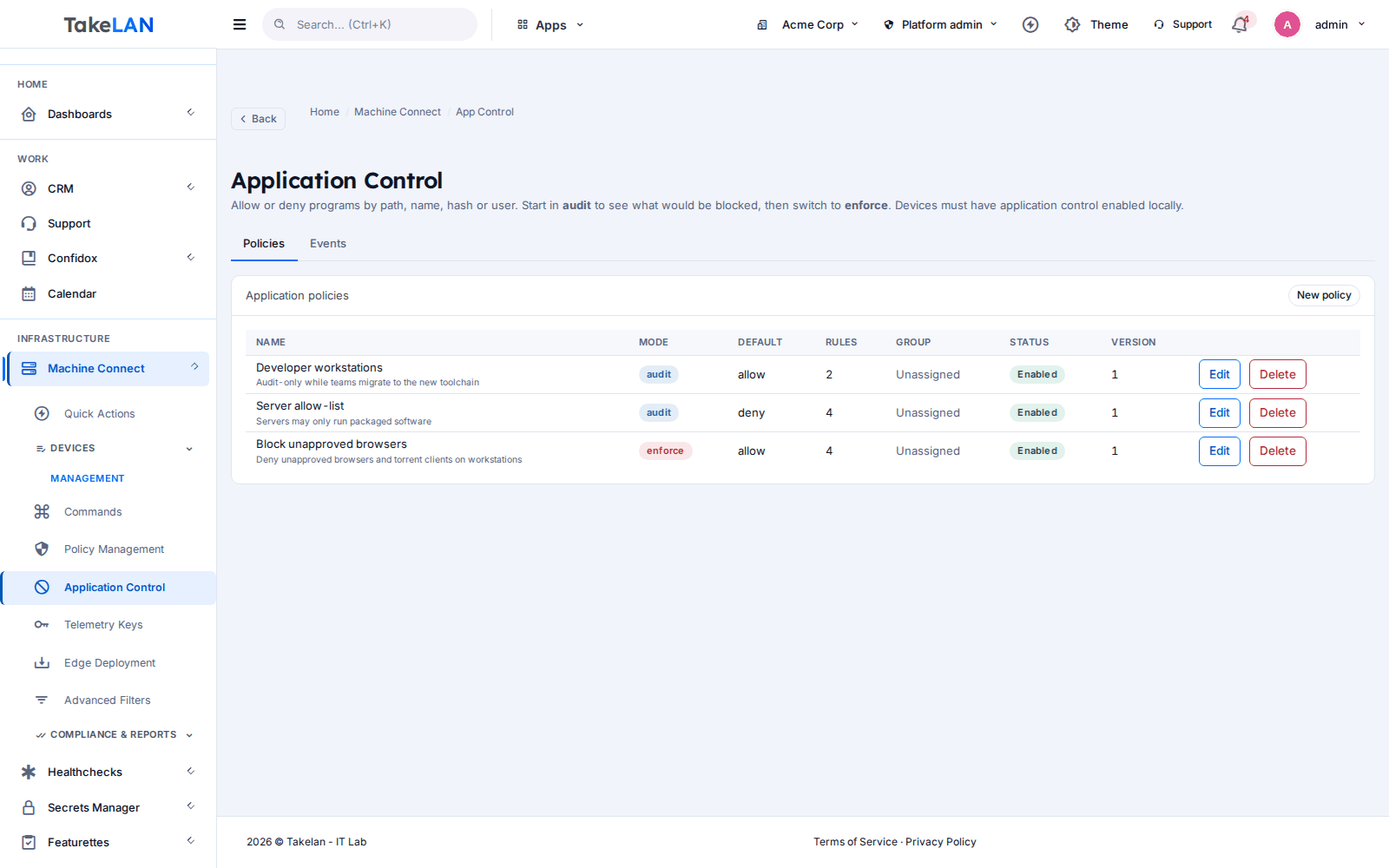
Application control policies.
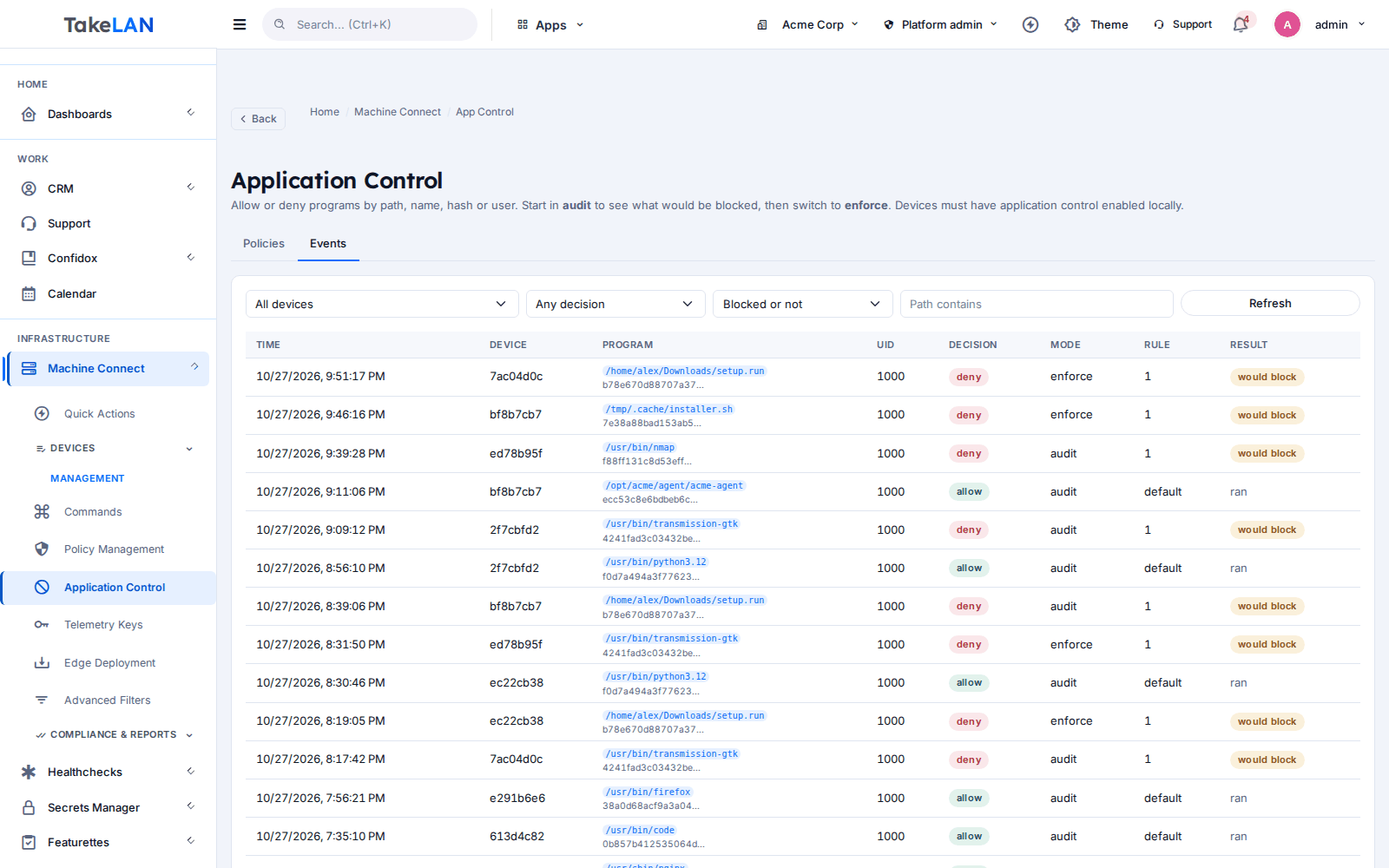
See every allow and deny event.
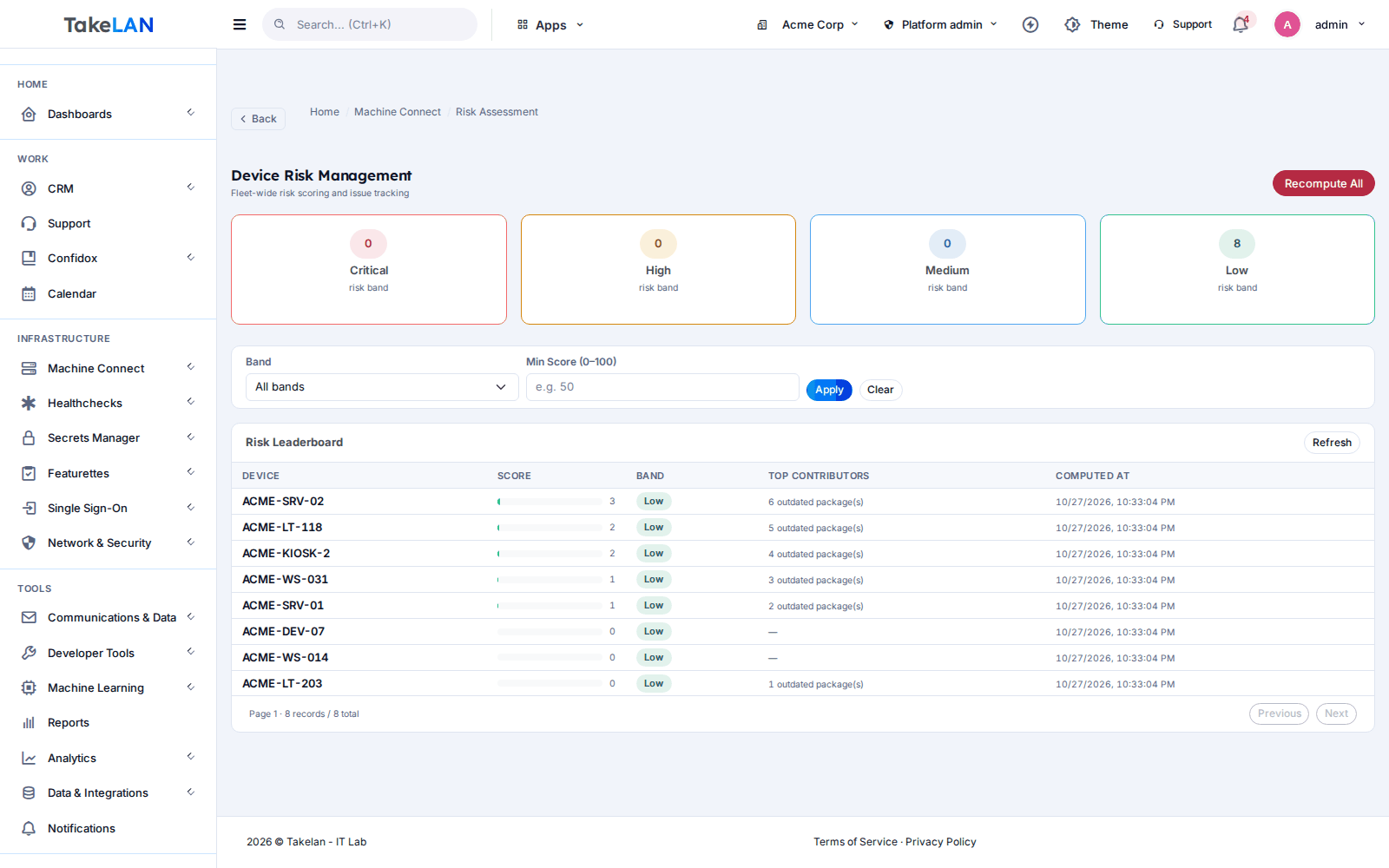
Risk dashboard: fix the worst machines first.
Affordable by design
Affordable by design. Tell us about your fleet and we will explain terms.
See pricingCommon questions
What is Linux device management (MDM)?
It means enrolling Linux machines in a central console so you can see them, set rules and act on them. Machine Connect covers inventory, lock and unlock, application control, packages, scripts and firewall rollout.
Is Machine Connect available now?
Yes. The control server and the Rust agent are available. Contact us to enroll your first devices.
Is Machine Connect remote access or remote desktop?
No. It manages and secures devices. It has no remote desktop, no VPN and no remote terminal. For SSH access to servers see the SSH Access Manager. To publish a local service, see Takelan Tunnels (Omnigate).
How do I enroll Linux devices with SSO?
You install the agent, run registration and sign in with Takelan SSO on the device. The device creates its own key, proves it holds it, and shows up in your list. You do not hand out enrollment tokens.
Which Linux systems does it support?
The agent targets Debian, Ubuntu and other systemd Linux on amd64. arm64, Windows and macOS are not supported.
Can I allow-list applications on Linux?
Yes. Application control checks programs at launch and matches by hash, path, file name or user. Start in audit mode to see what would be blocked, then enforce.
Can I lock a lost Linux laptop remotely?
Yes, that is a core action. A signed lock locks the screen, blocks logins, and can limit network traffic and disable USB. A dead-man timer can unlock the device if contact is lost. Remote wipe is not part of what we promise yet because it has not been validated on real encrypted disks.
Can an AI assistant manage my devices through MCP?
It can read, not act. The MCP endpoint is read-only by default. Writes need a tenant switch. Commands, scripts, package actions, firewall rollout and device actions are never offered to AI, so an assistant cannot run anything on a device.
Does it replace a full device-management suite?
Not today. A policy engine with baselines and drift fixes, patch rings and conditional access are not part of Machine Connect. It covers enrollment, lock, application control, inventory, risk and signed actions.
What does it cost?
Machine Connect is part of the Takelan platform, which is built to be affordable and easy to start. Contact us to discuss terms.
More from the platform
Want Linux device management on your terms?
Tell us about your fleet and we will get you started.