
Dynamic DNS: a fixed name for a changing IP
Give a home, office or machine with a changing IP a fixed name. Update it from a router, a script or a link.
Problems we solve
Does any of this sound like your week?
My home IP keeps changing and I lose access.
Give the machine a name. A router or a script updates the name whenever the address changes.
My router has a dynamic DNS page, but I need a provider.
Use the dyndns2 settings from the Update methods tab. Most routers and NAS boxes accept them.
A leaked update link could move my name.
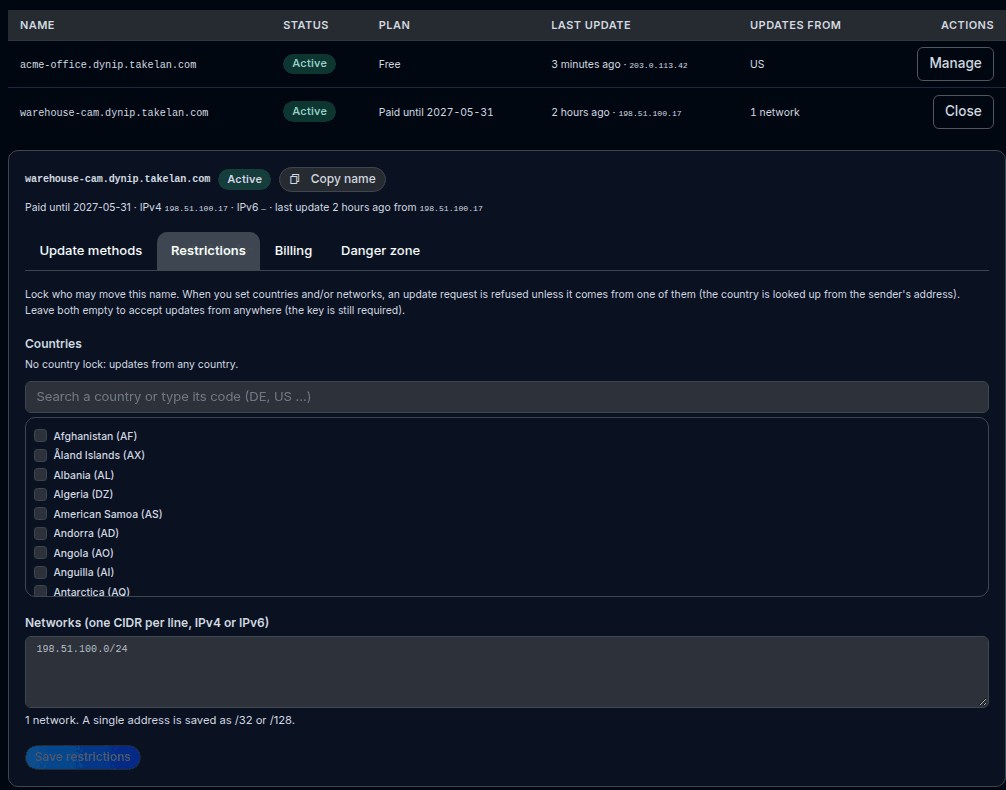
Rotate the key, and lock the name to your countries or networks so other addresses are refused.
I do not want a name sitting unused.
Free names that go quiet get a warning e-mail and a grace period before they are removed.
What it does
- Dynamic DNS gives a machine with a changing public IP address a fixed name, such as myhome.dynip.takelan.com. Reach your camera, NAS, game server or VPN by name, even when your internet provider changes your address.
- Claim a name under dynip.takelan.com or dynip.tkln.dev. The box tells you at once whether the name is free. Each user gets one free name. More names are paid by the year.
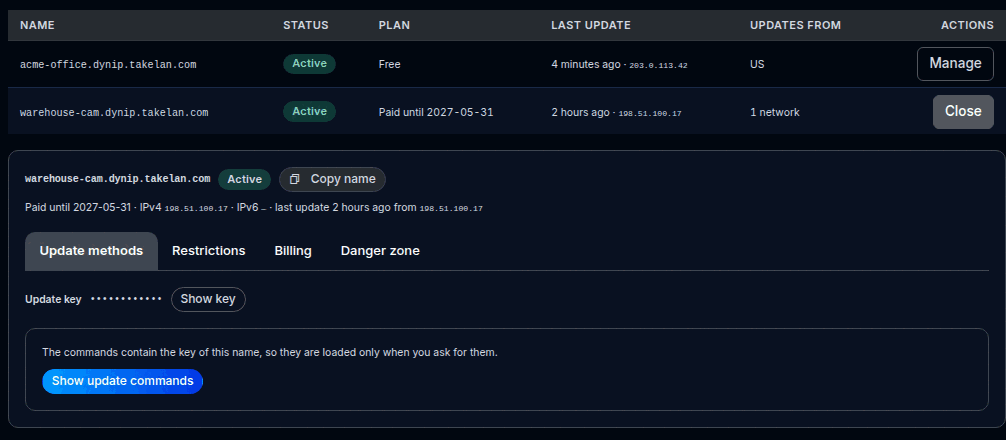
- Every name has its own update key. You get ready-to-paste update methods: an update link to open in a browser, curl, wget, PowerShell, a Windows scheduled task, a cron line, an IPv6 variant, and router settings for the dyndns2 protocol that most routers and NAS boxes support. The key is shown only when you ask for it, and you can rotate it if it leaks.
- You can lock a name to countries or networks. When a lock is set, an update is refused unless it comes from one of them. An address whose country is unknown is refused too. Leave the lock empty to accept updates from anywhere.
- A free name that sends no update for 7 days is scheduled for deletion, and you get a warning e-mail with 7 more days to keep it. Press Keep active, or send an update, to keep it. Paid names are never deleted while they are paid.
- Inside a domain you host with Takelan, you can also create dynamic DNS keys for your own names. A machine then updates its own A or AAAA record with a signed request. A key is limited to the names you choose, and the secret is shown once.
In the app
Real screens from a test setup with made-up names.
Example use cases3 examples
Reach a home camera or NAS by name
Claim a free name. Enter the router settings from the Update methods tab. The router updates the name when your provider changes the address.
Keep a small office VPN reachable
Put a cron line or a Windows scheduled task on a machine at the office. Lock the name to your country or office network so other addresses cannot move it.
Update your own domain from a script
In a hosted domain, create a dynamic DNS key for one record. A small script signs a request and sets the A record to the current address.
Try it
Update a name from a script (placeholder key)
# Use the address the request comes from
curl -fsS "https://app.takelan.com/api/v1/dynip/update?hostname=myhome.dynip.takelan.com&key=$DYNIP_KEY"

# Set an IPv6 address, and ask for JSON
curl -fsS "https://app.takelan.com/api/v1/dynip/update?hostname=myhome.dynip.takelan.com&key=$DYNIP_KEY&ipv6=2001:db8::10&format=json"
The key is shown in the console for each name. Keep it private. Answers are "good <ip>" for a change and "nochg <ip>" when nothing changed.
Router (dyndns2) settings
Service / protocol:  dyndns2   (choose "Custom" if your router lists no match)
Server:              app.takelan.com
Path:                /api/v1/dynip/nic/update?hostname=%h&myip=%i
Hostname:            myhome.dynip.takelan.com
Username:            myhome.dynip.takelan.com
Password:            <your update key>
These are the values shown in the Update methods tab. The username is the full name and the password is the key.
Check a name and read your names
curl "https://app.takelan.com/api/v1/dns/dynip/check?label=myhome&domain=dynip.takelan.com" \
  -H "Authorization: Bearer $TAKELAN_TOKEN"

curl "https://app.takelan.com/api/v1/dns/dynip" \
  -H "Authorization: Bearer $TAKELAN_TOKEN"
The first call says whether the name is available. The second lists the domains, your names and the limits.
Endpoints17 endpoints
GET /api/v1/dns/dynipThe dynamic DNS domains, your names and the limits.GET /api/v1/dns/dynip/checkIs label.domain available?POST /api/v1/dns/dynipClaim a name. The answer carries the update key and commands.GET /api/v1/dns/dynip/{id}One name.PATCH /api/v1/dns/dynip/{id}Change the country and network lock.POST /api/v1/dns/dynip/{id}/keep-activeClear the inactivity warning and restart the clock.POST /api/v1/dns/dynip/{id}/renewPay for one more year.POST /api/v1/dns/dynip/{id}/rotate-keyMake a new update key. The old key stops working at once.GET /api/v1/dns/dynip/{id}/commandsThe update key and ready-to-paste commands. Each read is audited.DELETE /api/v1/dns/dynip/{id}Delete a name and remove its records.GET /api/v1/dynip/updatePublic update with the key. Also POST. No login: the key is the credential.GET /api/v1/dynip/nic/updatedyndns2-style update for routers, with HTTP Basic (name and key).GET /api/v1/dynip/u/{key}A small page that updates the name when opened. Add ?format=text for plain text.GET /api/v1/dns/zones/{id}/ddns/keysDynamic DNS keys of a hosted domain. Secrets are never listed.POST /api/v1/dns/zones/{id}/ddns/keysCreate a key limited to chosen names. The secret is shown once.DELETE /api/v1/dns/zones/{id}/ddns/keys/{key_id}Revoke a key on every nameserver.GET /api/v1/ddns/myipPublic: the address the request comes from.
Common questions
What is dynamic DNS?
A name that follows your changing IP address. A router or a script tells Takelan the new address, and the name points to it a moment later.
Is there a free dynamic DNS name?
Yes, one free name per user under dynip.takelan.com or dynip.tkln.dev. More names are paid by the year. See the pricing page for current prices.
Will my router work with it?
Most routers and NAS boxes have a dynamic DNS page that supports the dyndns2 protocol. Use the router values from the Update methods tab. Check your device's own settings page for the exact field names.
What if I stop sending updates?
A free name with no update for 7 days is scheduled for deletion and you get a warning e-mail. You have 7 more days to press Keep active or send an update. Paid names are never deleted while they are paid.
Can someone else move my name?
Only with your update key. Keep it private, rotate it if it leaks, and lock the name to countries or networks so updates from other addresses are refused.
Does it support IPv6?
Yes. A name can hold an IPv4 and an IPv6 address. Send the ipv6 parameter, or use the IPv6 command from the console.
Can I use my own domain?
Yes, in a domain you host with Takelan DNS. Create a dynamic DNS key for the names you choose. The key is signed and limited to those names.
Is it available to everyone?
It is available.