
DNS Hosting API: your domain on Takelan nameservers
Host your domains on Takelan nameservers in three locations. Manage records, zone versions and DNSSEC from the app or an API.
Problems we solve
Does any of this sound like your week?
A typo in a DNS record took the site down.
Records are checked before they go live, and every change is a version. Restore the last good one in a single step.
Someone could claim a domain they do not own.
A domain is served only after you prove ownership by delegation or a TXT record.
I cannot tell if all my nameservers agree.
The sync check compares the zone on every nameserver and lists what differs.
DNS is hard to automate.
Everything the console does is an HTTP route. Create zones, change records and read the query log from a script.
What it does
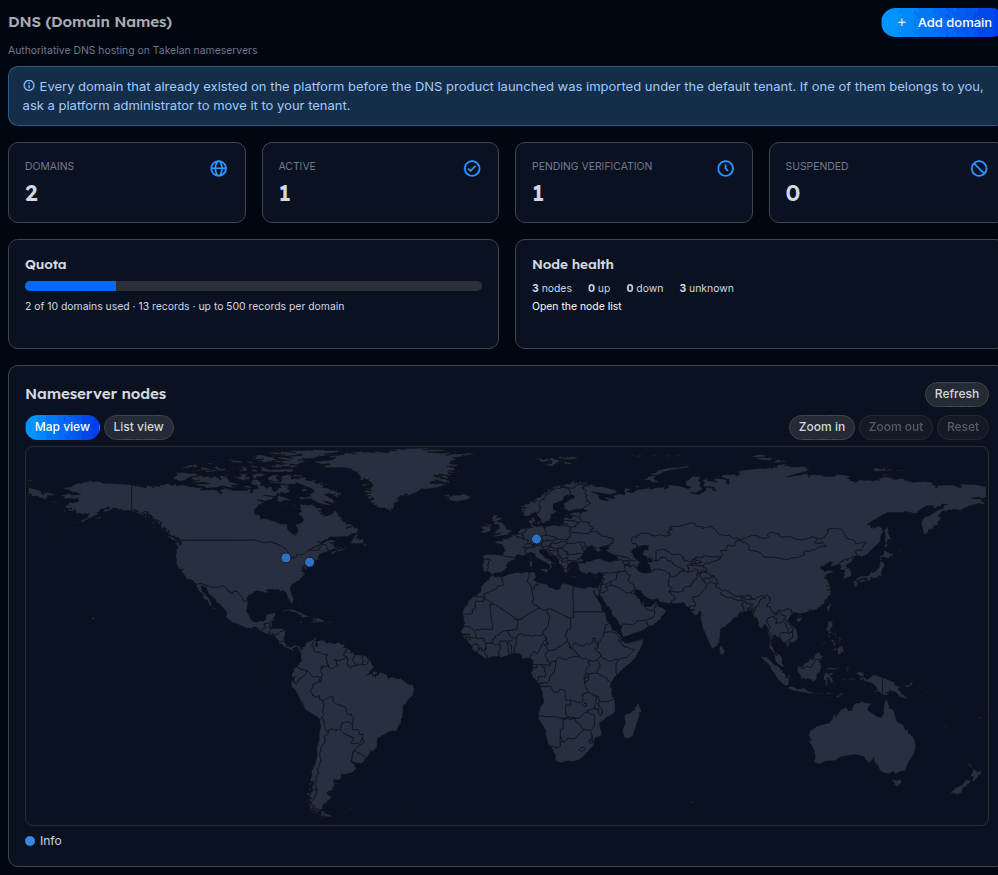
- The DNS Hosting API lets you serve your own domain from Takelan nameservers. Add a domain, prove you own it, then manage its records from the console or over HTTP. The nameservers run in Michigan, New Jersey and Germany and copy every change to each other.
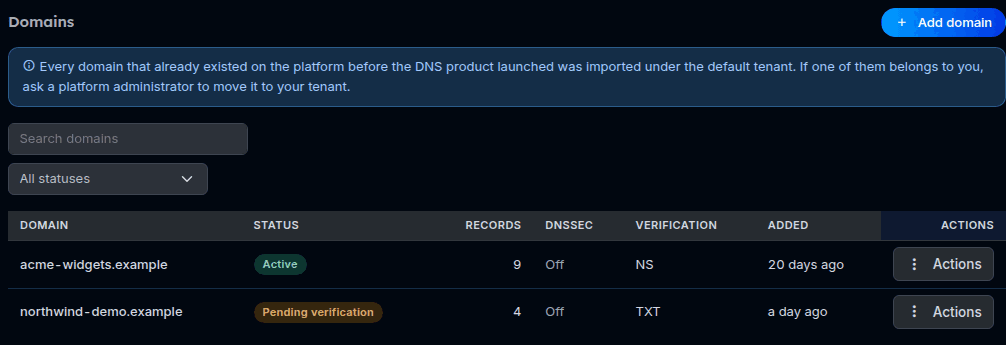
- A domain is only served after you prove you own it. You can prove it by pointing the domain at the Takelan nameservers, or by publishing a TXT record. Until then it is not on any nameserver, so nobody can take over a name they do not control.
- You manage A, AAAA, CNAME, MX, TXT, NS, SRV, CAA and PTR records. Edit one record, change several at once with a preview first, or import and export a zone file. Takelan checks the zone before it goes live, so a typo is refused with a clear reason.
- Every change is saved as a version. Compare two versions and restore an older one in a single step. Each write answers with a per-nameserver report that says whether every location has the change yet.
- A "Servers in sync" check reads the zone from each nameserver and tells you when they differ. Each domain also has a query log and resolution stats: how many queries, which names, which results and the time to answer. Client addresses are shortened by default, and you set how long the log is kept.
- DNSSEC is part of each domain. You can see the signing state and the DS records to publish at your registrar. Turning signing on is available only when the platform has enabled it for the cluster.
- Limits on the number of domains and records apply per organization. Access follows your Takelan roles: read, create, update and delete are separate permissions.
In the app
Real screens from a test setup with made-up names.
Example use cases4 examples
Move a domain to Takelan nameservers
Add the domain with its records, publish the nameserver names at your registrar, press Verify now. The domain goes live on all nameservers once the check passes.
Change many records safely
Send the full record set with dry_run set. Read what would change. Send it again without dry_run to apply it, and roll back by version if you need to.
See who is asking for your names
Open the query log for a domain to see recent questions and results, or the stats for top names and names that do not exist. Use it to spot a typo in a record or an odd client.
Give a machine at home a stable name
Create a dynamic DNS key for a record in your domain. A script or router then updates its A or AAAA record when the address changes.
Try it
Add a domain and start verification
curl -X POST https://app.takelan.com/api/v1/dns/zones \
  -H "Authorization: Bearer $TAKELAN_TOKEN" -H "Content-Type: application/json" \
  -d '{"name": "example.org", "verification_method": "ns",
       "records": [{"name": "www", "type": "A", "value": "1.1.1.1", "ttl": 3600}]}'

# Then ask Takelan to check the proof
curl -X POST https://app.takelan.com/api/v1/dns/zones/<zone-id>/verification/check \
  -H "Authorization: Bearer $TAKELAN_TOKEN"
Use verification_method "txt" to publish a TXT record instead of changing nameservers. The zone is written to the nameservers when the check passes.
Preview a full record set, then roll back
curl -X POST https://app.takelan.com/api/v1/dns/zones/<zone-id>/records/bulk \
  -H "Authorization: Bearer $TAKELAN_TOKEN" -H "Content-Type: application/json" \
  -d '{"dry_run": true, "records": [{"name": "www", "type": "A", "value": "1.0.0.1", "ttl": 300}]}'

curl -X POST https://app.takelan.com/api/v1/dns/zones/<zone-id>/versions/<version-id>/rollback \
  -H "Authorization: Bearer $TAKELAN_TOKEN" -H "Content-Type: application/json" \
  -d '{"dry_run": true}'
The bulk route takes the complete record set for the zone, so list every record you want to keep. Both calls accept dry_run. A write answers with a replication report per nameserver.
Endpoints26 endpoints
GET /api/v1/dns/zonesList your domains.POST /api/v1/dns/zonesAdd a domain with a verification method and optional starting records.GET /api/v1/dns/zones/{id}One domain, with its live SOA and nameservers.DELETE /api/v1/dns/zones/{id}Delete a domain from every nameserver.POST /api/v1/dns/zones/{id}/verification/startChoose a verification method and get the challenge.POST /api/v1/dns/zones/{id}/verification/checkCheck ownership. A pass activates the domain.GET /api/v1/dns/zones/{id}/recordsList records.POST /api/v1/dns/zones/{id}/recordsAdd a record.PUT /api/v1/dns/zones/{id}/records/{record_id}Change a record value, TTL or comment.DELETE /api/v1/dns/zones/{id}/records/{record_id}Delete a record.POST /api/v1/dns/zones/{id}/records/bulkReplace the whole record set in one step, with dry_run.GET /api/v1/dns/zones/{id}/soaRead the SOA timers.PUT /api/v1/dns/zones/{id}/soaChange the SOA timers.GET /api/v1/dns/zones/{id}/versionsList saved versions of a zone.GET /api/v1/dns/zones/{id}/versions/{version_id}/diff/{to}Compare a version with another one or with the current zone.POST /api/v1/dns/zones/{id}/versions/{version_id}/rollbackRestore a version, with dry_run.GET /api/v1/dns/zones/{id}/sync-checkCompare the zone on every nameserver.GET /api/v1/dns/zones/{id}/dnssecDNSSEC state per nameserver.GET /api/v1/dns/zones/{id}/dnssec/dsDS records to publish at your registrar.POST /api/v1/dns/zones/{id}/dnssec/enableTurn DNSSEC signing on, when the platform allows it.GET /api/v1/dns/zones/{id}/queriesQuery log of one domain, newest first, with filters and paging.GET /api/v1/dns/zones/{id}/statsCounts by time, name, result, type and nameserver.PUT /api/v1/dns/zones/{id}/queries/settingsSet log retention and client-address shortening.GET /api/v1/dns/nodesNameserver locations and state.GET /api/v1/dns/usageYour quota and use.GET /api/v1/dns/auditRead-only audit trail of DNS changes in your organization.
Common questions
Can I host my domain's DNS with Takelan?
Yes, in the DNS Hosting product. Add the domain, prove you own it and manage its records.
Where are the nameservers?
Michigan, New Jersey and Germany. They run active-active and copy every change to each other.
How do I prove I own a domain?
Either point the domain at the Takelan nameservers at your registrar (delegation), or publish a TXT record that Takelan gives you. Until it passes, the domain is not served.
Can I undo a bad change?
Yes. Every change is saved as a version. Compare versions and restore an older one. Full record set updates and rollbacks accept dry_run so you can preview first.
Does it support DNSSEC?
The console shows the signing state and the DS records for your registrar. Turning signing on is available only after the platform has enabled it for the cluster.
Can I see what queries my domain gets?
Yes. Each domain has a query log and stats. Client addresses are shortened by default and the log is kept only for the retention period you set, within a platform maximum.
Is there an API?
Yes. Every console action is an HTTP route under /api/v1/dns. It uses your Takelan token and your role permissions.
Is there a dynamic IP option?
Yes. See Dynamic DNS for names such as myhome.dynip.takelan.com, and the dynamic DNS keys inside a hosted domain.